Order terminalRevenue
View revenue
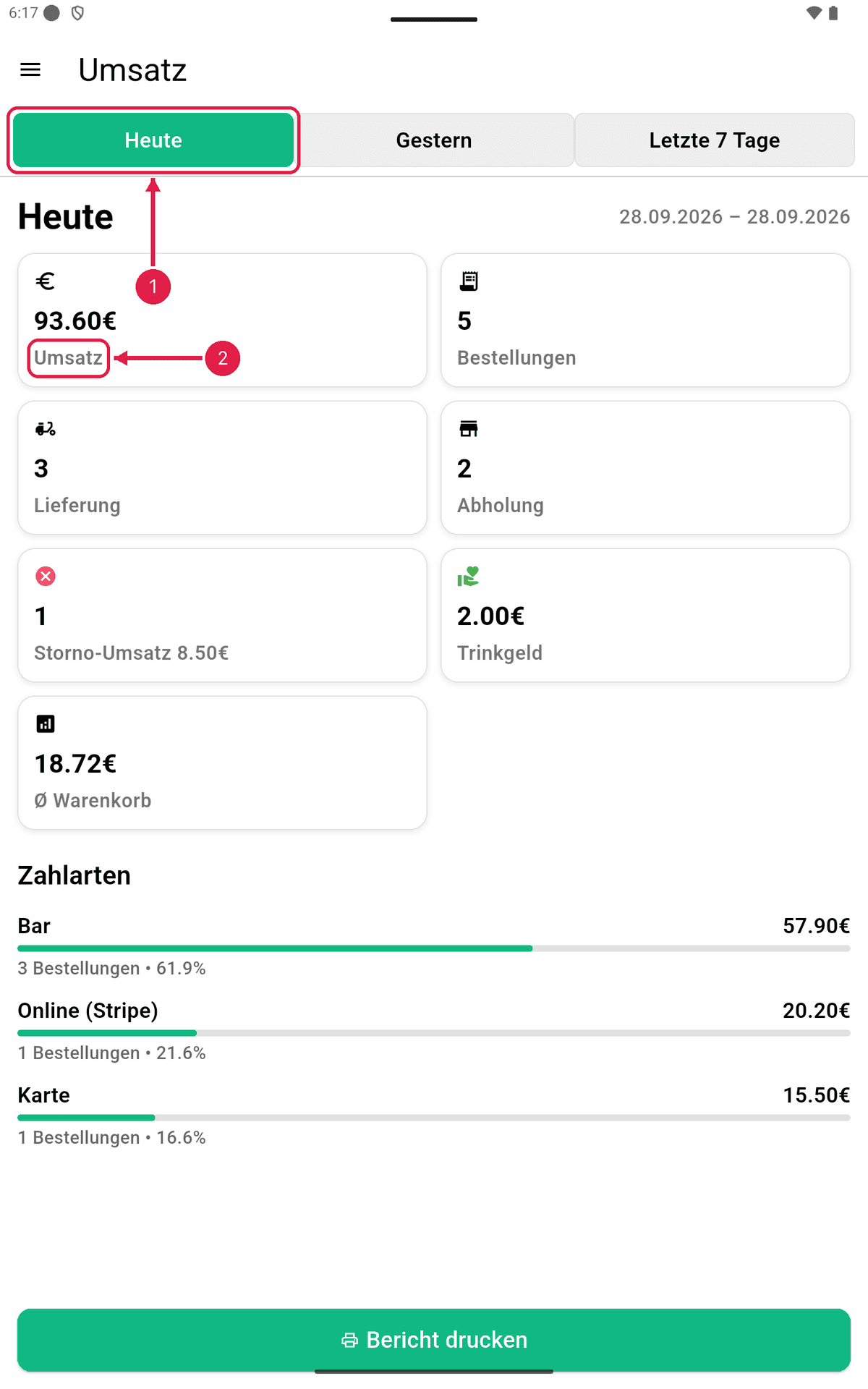
View revenue, orders, deliveries, pickups, tips and basket for today, yesterday or the last 7 days.
What it is for
Under Umsatz (revenue) you see your restaurant's figures directly at the terminal.
What changes
- Period: Heute (today), Gestern (yesterday) or Letzte 7 Tage (last 7 days).
- Tiles: Umsatz (revenue), Bestellungen (orders), Lieferung (delivery), Abholung (pickup), the number of cancellations with Storno-Umsatz (cancelled revenue), Trinkgeld (tips) and Ø Warenkorb (average basket).
- Cancelled orders do not count towards revenue, they are shown separately.
- The tip tile is missing if tips are hidden on the terminal in the admin area.
- Below the tiles are Nach Bestellart (by order type) and Zahlarten gesamt (all payment methods), see Analyse payment methods.
- The figures are an overview; the accounting report is in the admin area under Berichte.
Requirements
The order terminal is connected with your restaurant.
Step by step
View revenue
Open Umsatz (revenue) in the menu. If a PIN lock is set up, enter the PIN first. Choose the period at the top.
Result
You know the figures for the period.