Download the QR code
Save your shop's QR code as an image, for example for flyers, menus or stickers.
What it is for
Under QR-Code hfoods automatically creates a QR code for your business. Guests scan it with their phone camera and go straight to ordering. You download it as an image and use it in your own printed materials.
What changes
- You get a high resolution PNG file (2048 pixels), black on white, suitable for printing.
- The file is named after your business, for example "qr-code-pizzeria-testbetrieb.png".
- The message QR-Code heruntergeladen (QR code downloaded) confirms the download.
- The code leads to the right destination via the Intelligente Weiterleitung (smart redirect), see Check the smart redirect.
Requirements
You are signed in to the admin area as the owner.
Step by step
Download
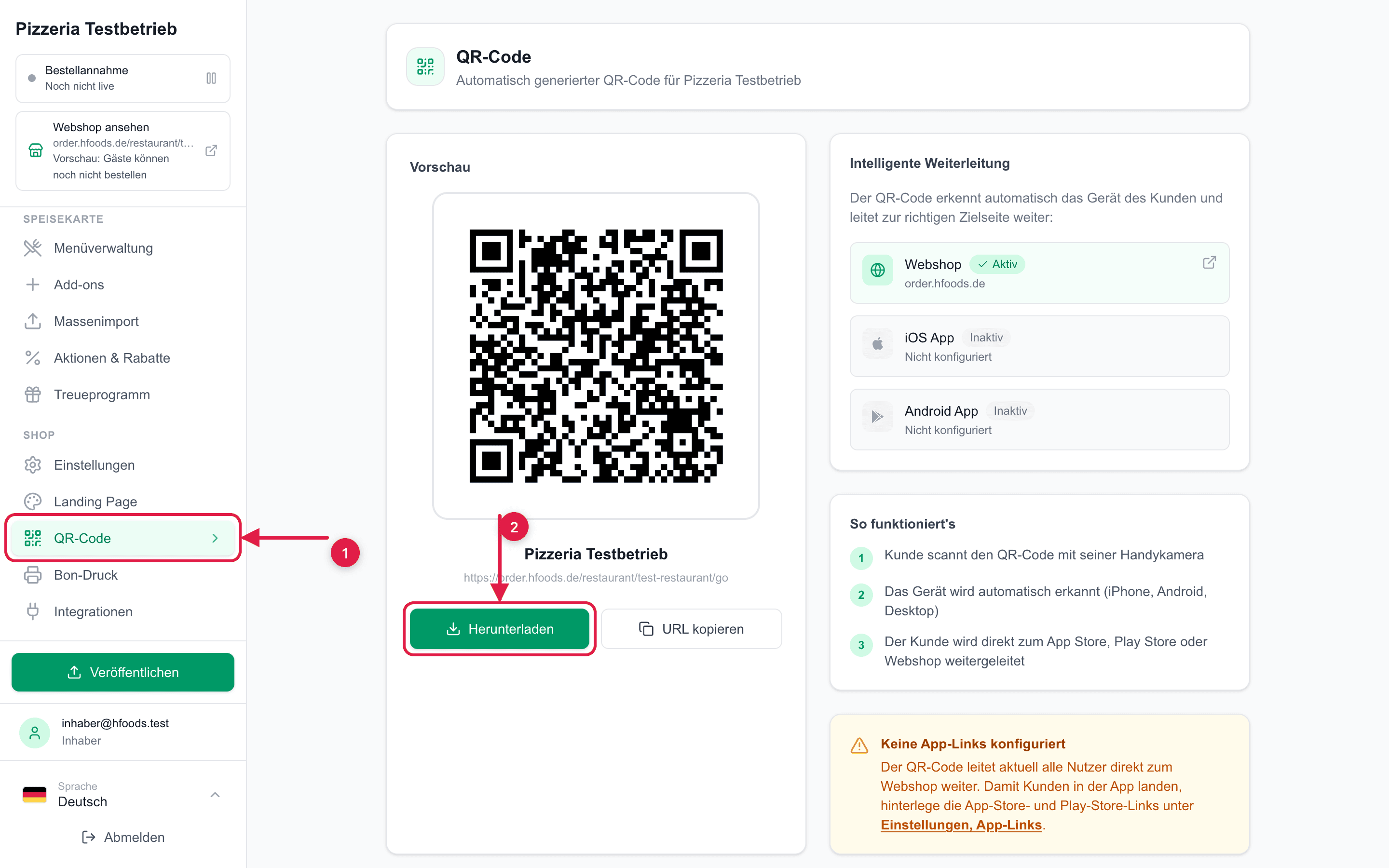
In the sidebar on the left, click QR-Code. Under Vorschau (preview) you see the code with your business name and the address it leads to. Click Herunterladen (download).
Result
The image is in your downloads folder.
The code stays valid
The code always leads to the same address. If you change the menu, prices or app links, you do not need to print it again. If your own domain is connected, the code leads to your domain.