Add or change your payment method
Add the bank account or card for your hfoods invoices or replace it with a new one.
What it is for
On the Zahlungsart (payment method) tab under Vertrag und Rechnungen (contract and invoices) you see how you pay your hfoods invoices and can change the payment method, for example after switching banks. You enter the details at our payment partner Stripe. hfoods never sees your full IBAN or card number.
During the trial you also add your first payment method here. Above the card you then see how long your trial stays free, for example "Noch 20 Tage kostenlos" (20 days left free) with your last trial day, and the card tells you by when you need the payment method to keep your shop running after the trial. If you booked when a payment method was still required to book, this notice is not shown.
What changes
- If you add your first payment method during the trial, your shop keeps running after the trial without a break. Your package is then charged from the first invoice day.
- Your next invoices are charged to the new payment method.
- Nothing is charged now.
- The new payment method appears in the Verlauf (history) of your contract.
Requirements
- You are signed in to the admin area as the owner. Staff members do not see this area.
- You booked your business yourself on hfoods.de. If a sales partner looks after you, you get your contract and invoices from the partner.
Step by step
Open the Zahlungsart tab
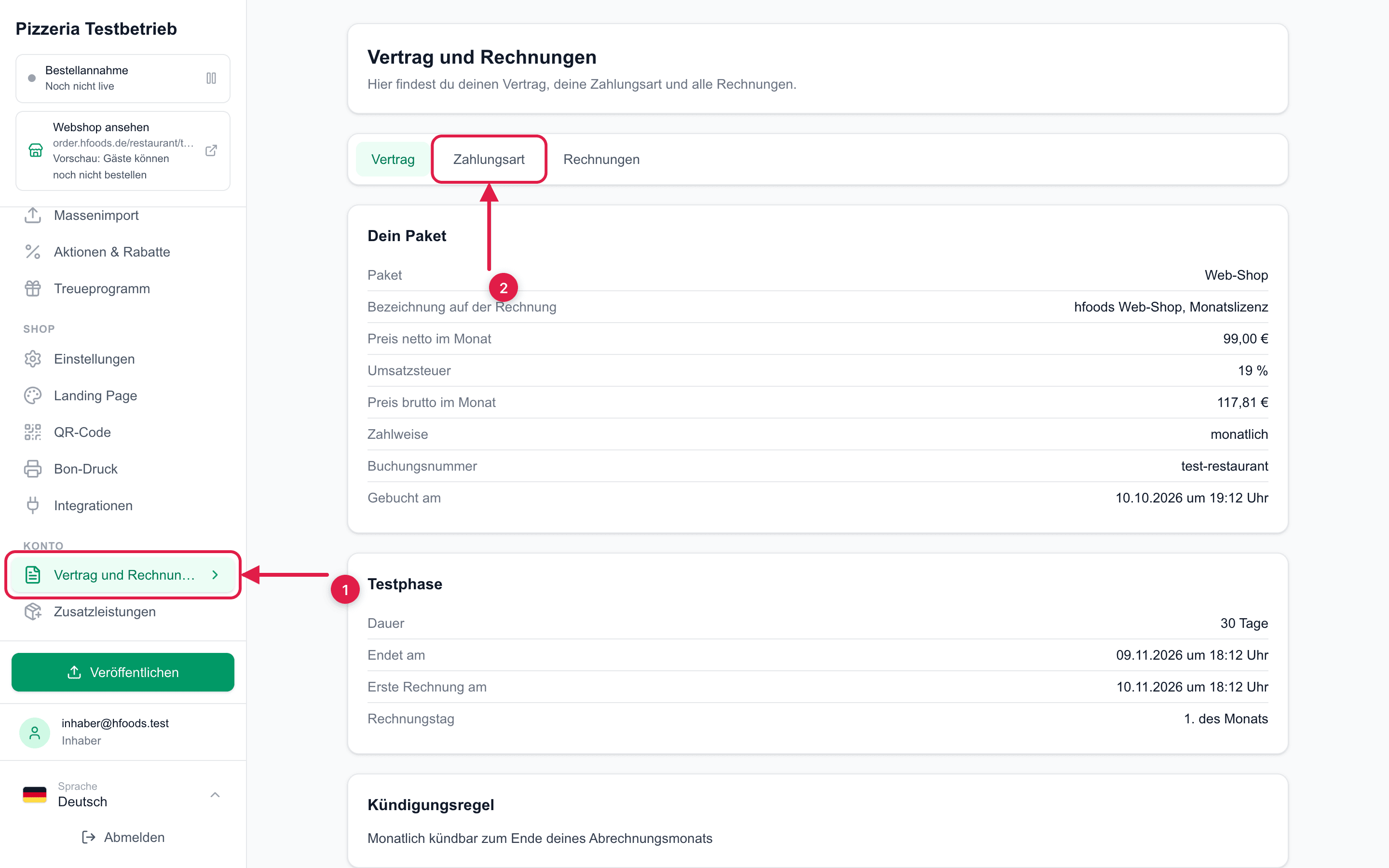
Click Vertrag und Rechnungen on the left and then the Zahlungsart tab at the top.
Agree and change the payment method
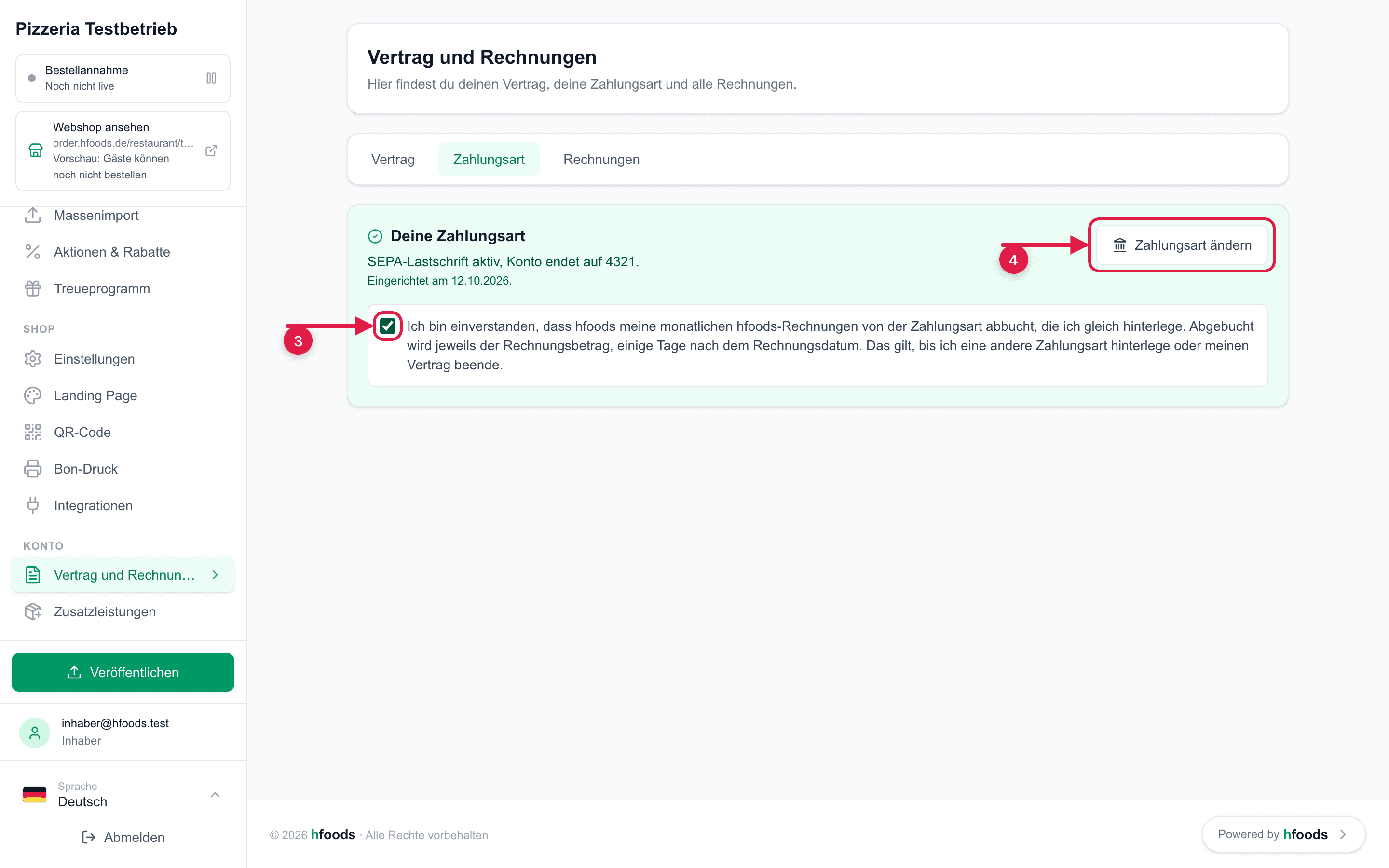
The card shows your active payment method, for example "SEPA-Lastschrift aktiv, Konto endet auf 4321." (SEPA direct debit active, account ending in 4321) and since when it has been set up. If you can choose between direct debit and card, first tick the box that allows the charges. Then click Zahlungsart ändern (change payment method). If only direct debit is possible, the button reads Bankverbindung ändern (change bank account) and there is no checkbox. If no payment method is on file yet, the card is called Hinterlege deine Zahlungsart (add your payment method) and the button reads Zahlungsart hinterlegen (add payment method) or Lastschrift einrichten (set up direct debit).
Enter the new details at Stripe
On the Stripe page you choose card or direct debit, enter the new card or bank account and confirm. For a card, your bank often asks for an extra confirmation, for example in its app. Afterwards you return to Vertrag und Rechnungen. The page checks for a few seconds until the new payment method is confirmed.
Result
The card shows your new payment method with the last digits, and for a card also the brand and expiry date, for example "Karte Visa aktiv, Endziffern 4242, gültig bis 12/2034." (Visa card active, ending in 4242, valid until 12/2034). If your card expires this month or next month, the card points this out. If you cancel at Stripe, your previous payment method stays unchanged and the card reads "Die Einrichtung wurde abgebrochen, es wurde nichts gespeichert." (the setup was cancelled, nothing was saved).
Frequently asked questions
The tab says our team sets up the payment method.
If you concluded your contract directly with our team, the tab only shows your payment method. If something should change, write to info@highfoods.de.
When does the new payment method apply?
To every charge that starts after the confirmation. We charge a card no earlier than five calendar days after the invoice date.
The tab only shows the card "Paket Free".
Then your shop is on the Free plan, for example because your trial ran out without a payment method. Free has no hfoods invoice, so there is no payment method on its own here. You add your payment method when you book a package with Paket buchen (book package), see Free plan.