Free plan
How the free Free plan works, what is counted, what happens at 30 orders a month and how to switch to a package.
What it is for
Free is the free plan from hfoods for restaurants that booked themselves. It costs 0.00 € permanently and includes up to 30 orders per calendar month. You do not need a payment method for it, and you do not get an invoice.
There are two ways onto the Free plan: you book it directly on hfoods.de with Kostenlos buchen (book for free), or you try the Web-Shop or App-Shop and do not add a payment method by the end of the trial. Your shop then automatically continues on the Free plan after your last trial day, with everything you have set up.
What changes
- Your shop accepts orders as before, at your address with hfoods.
- You pair the order terminal app on your own Android device as usual, see Pair, reset PIN, unpair a device. You connect a domain you already own in the same way, see Connect your own domain.
- The Free plan does not include your own app or the paid add-on services, such as buying an order terminal. Your own app comes with the App-Shop, the add-on services with both the Web-Shop and the App-Shop. The shop shows a small note "Powered by hfoods".
- Accepted and completed orders count. Cancelled and rejected orders do not.
- At 20 orders in a month you get an email that 10 are left. At 30 orders you get another email. Your shop keeps accepting orders as normal until the end of the month.
- If your shop had more than 30 orders last month, we ask you by email to book a package.
- If your shop is above 30 orders for two calendar months in a row and no package is booked, we pause online ordering. We announce this by email at least seven days in advance. Guests then still see your shop, with a note that online ordering is currently not available. Your data stays complete, and as soon as you book a package, your shop accepts orders again straight away.
Requirements
- You booked your business yourself and are signed in as Inhaber (owner). Only the owner can book a package.
- To switch to a package, have your bank account (IBAN) or your card at hand.
- An invoice recipient with an address is on file for your invoices. If you booked the Free plan without an address, add it first under Vertrag und Rechnungen (contract and invoices) in the card Rechnungsempfänger (invoice recipient). Without it you can't book a package.
Step by step
See your orders this month
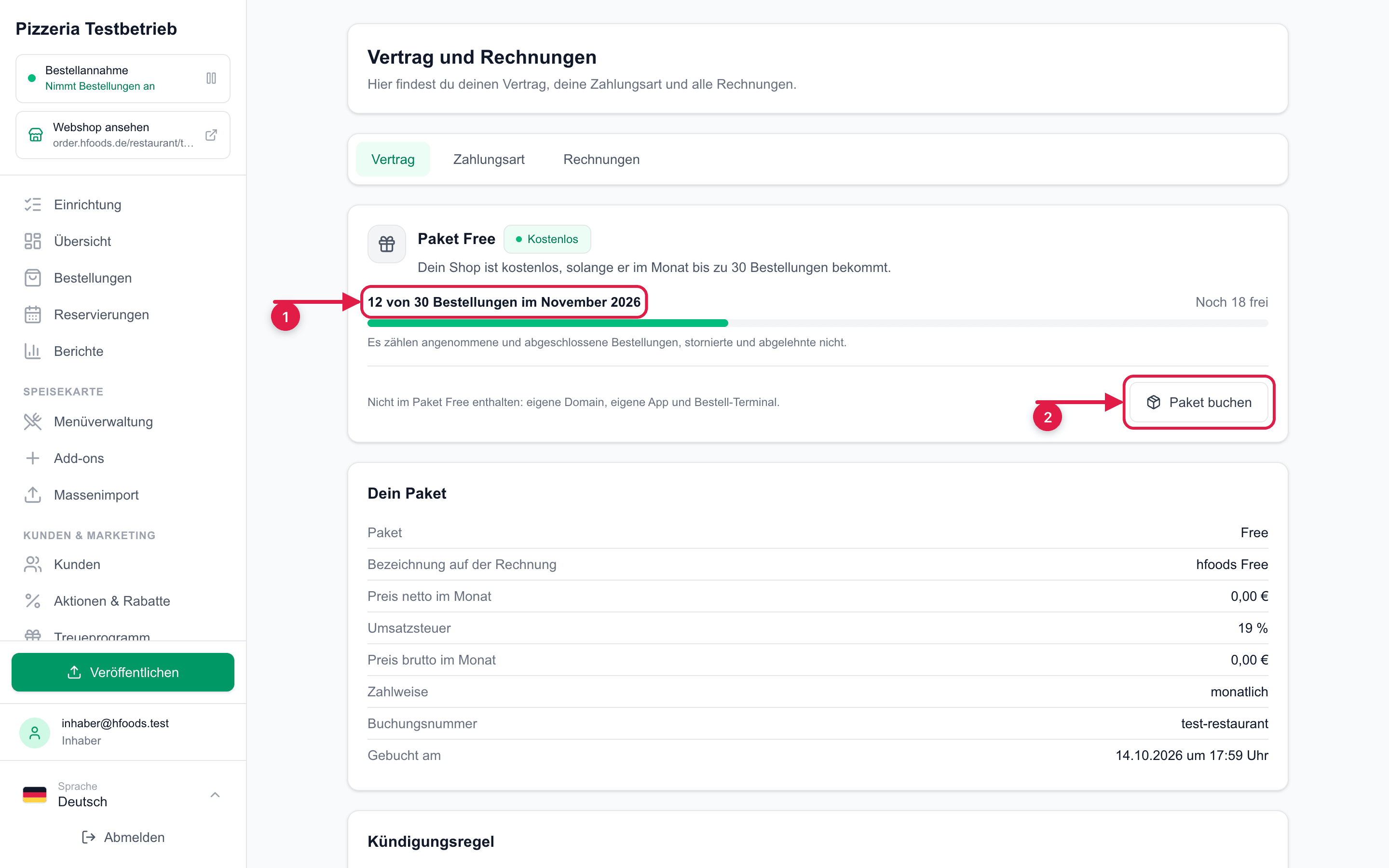
Click Vertrag und Rechnungen (contract and invoices) on the left. The card Paket Free (Free plan) is at the very top. It shows how many orders your shop has had this month, for example "12 von 30 Bestellungen im November 2026" (12 of 30 orders in November 2026), and on the right how many are still free. The same card is also on the Einrichtung (setup) page.
Choose a package
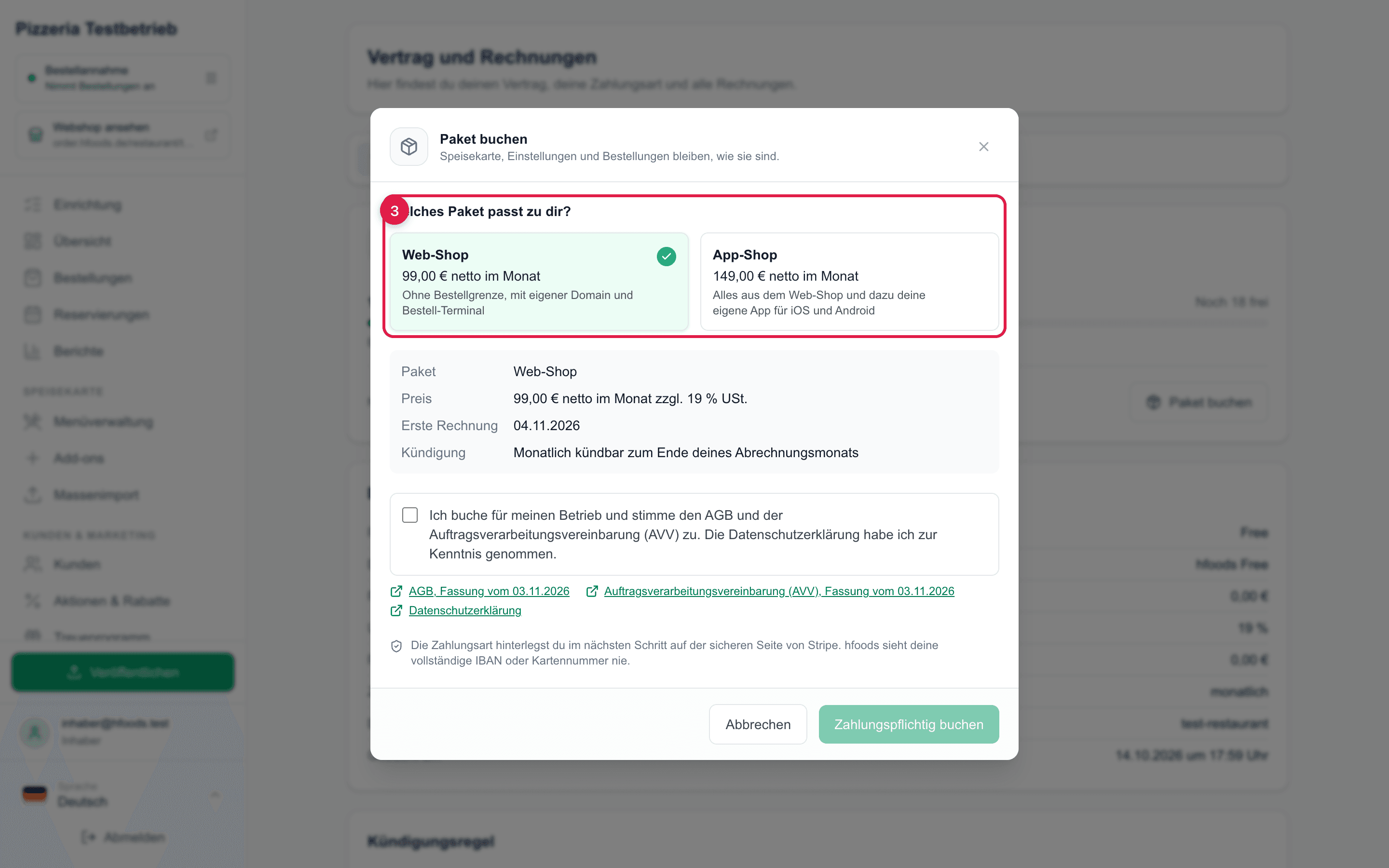
If you need more than 30 orders a month, your own app or an add-on service, click Paket buchen (book package) in the card. Paket buchen opens with the question Welches Paket passt zu dir? (which package suits you?). Choose Web-Shop or App-Shop. Below you see the package, the price, the date of the first invoice and the cancellation rule, for example "Monatlich kündbar zum Ende deines Abrechnungsmonats" (cancellable monthly at the end of your billing month). There is no trial when you switch. Menu, settings and orders stay as they are.
Agree and book
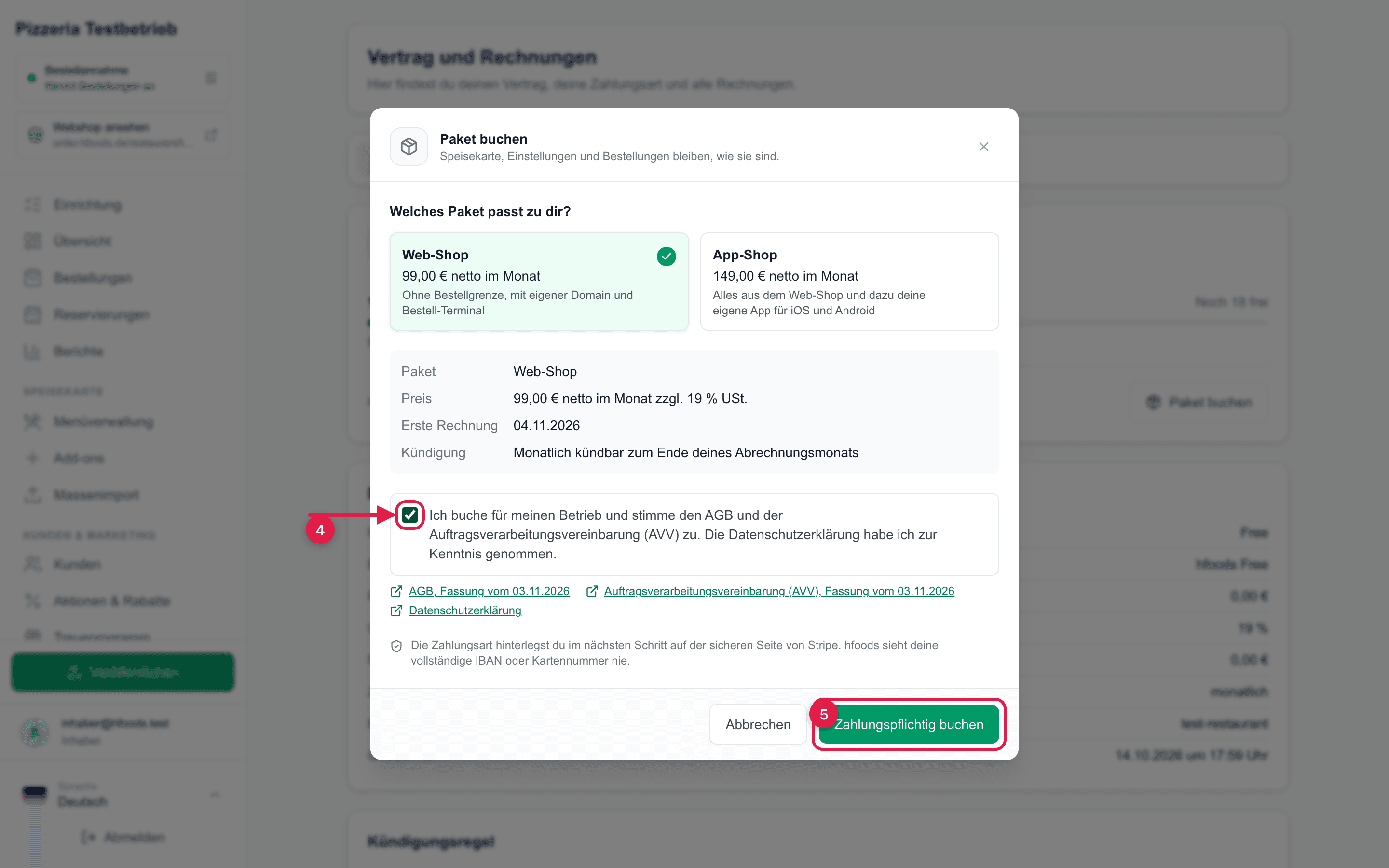
Read the terms and the data processing agreement (AVV) using the links below the box. Tick "Ich buche für meinen Betrieb und stimme den AGB und der Auftragsverarbeitungsvereinbarung (AVV) zu." (I am booking for my business and agree to the terms and the data processing agreement) and click Zahlungspflichtig buchen (book with obligation to pay). Without the tick the button stays grey. You land on the page of our payment partner Stripe and add your payment method there. hfoods never sees your full IBAN or card number.
Result
As soon as your payment method is confirmed, your shop runs on the chosen package, with no limit on orders. If online ordering was paused, your shop accepts orders again straight away. You get a confirmation by email, for example "Dein Paket Web-Shop bei hfoods ist gebucht" (your Web-Shop package with hfoods is booked), with the package, the price, the first invoice and your payment method.
Frequently asked questions
Is Free really free?
Yes. Free costs 0.00 €, today and in every month after. Nothing is debited.
Will my shop be switched off in the middle of the month if I go above 30 orders?
No. The current month runs to its end without interruption. Online ordering is only paused if your shop is above the limit for two calendar months in a row and no package is booked, and only after we have announced it.
Can I use the order terminal app and connect my domain on the Free plan?
Yes. You use the order terminal app on your own Android device and a domain you already own on Free just as you would on a package. The only limit on Free is the 30 orders per calendar month. Paid add-on services such as buying an order terminal need a package.
Can I cancel Free?
Yes, at any time with the card Vertrag kündigen (cancel contract) under Vertrag und Rechnungen. The cancellation takes effect immediately, see Cancel your contract.
I tried a package and did not add a payment method. Has my contract ended?
No. Your shop continues on the Free plan after your last trial day, and you get an email with the name of your restaurant, for example "Dein Shop Pizzeria Testbetrieb läuft jetzt im Paket Free weiter" (your shop now continues on the Free plan). You can book your package again at any time with Paket buchen.