Assign add-on groups during import
In the assignments step of bulk import, set for which categories or items each add-on group appears.
What it is for
An add-on group only appears with the categories or items it is assigned to. The import takes over assignments from the CSV file. In the Zuweisungen (assignments) step you check and add to them. The step is optional.
What changes
The assignments are saved in the Import step together with the menu. Groups without an assignment appear with no item.
Requirements
You are in bulk import and have completed the Addon-Gruppen (add-on groups) step, see Create add-on groups during import.
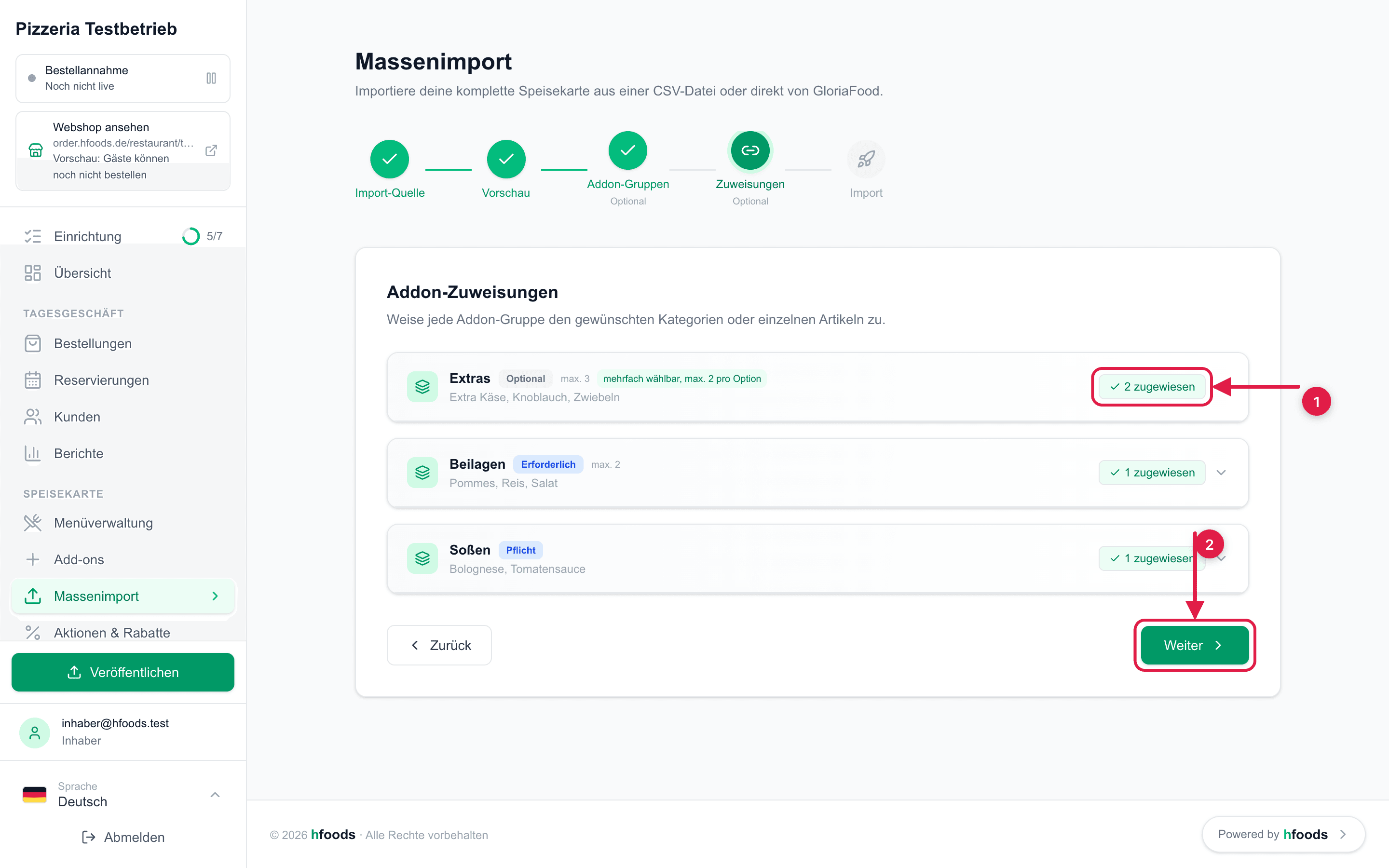
Weiter starts the import
Weiter (next) in this step starts the import immediately. Check beforehand that Bestehende Speisekarte ersetzen (replace existing menu) is set correctly, see Replace the existing menu.
Step by step
Check the assignments and continue
Under Addon-Zuweisungen (add-on assignments) each group is listed with its options. On the right you see how many targets it is assigned to, for example "2 zugewiesen" (2 assigned), or Nicht zugewiesen (not assigned). Expand a group to select or deselect categories or individual items. Zurück (back) takes you to the add-on groups. If everything is right, click Weiter.
Result
The import runs, see Finish the import.