Set receipts by order type
Set on the terminal whether the customer receipt, kitchen ticket and bag label are printed always, only for deliveries or only for pickups.
What it is for
In the card Bons nach Bestellart (receipts by order type) you set directly on the terminal which orders each receipt type is printed for. So you do not need the admin area for this setting.
An example: the Tüten-Etikett (bag label) is set to Nur Lieferung (delivery only). For a delivery the customer receipt and the label are printed, for a pickup only the customer receipt.
What changes
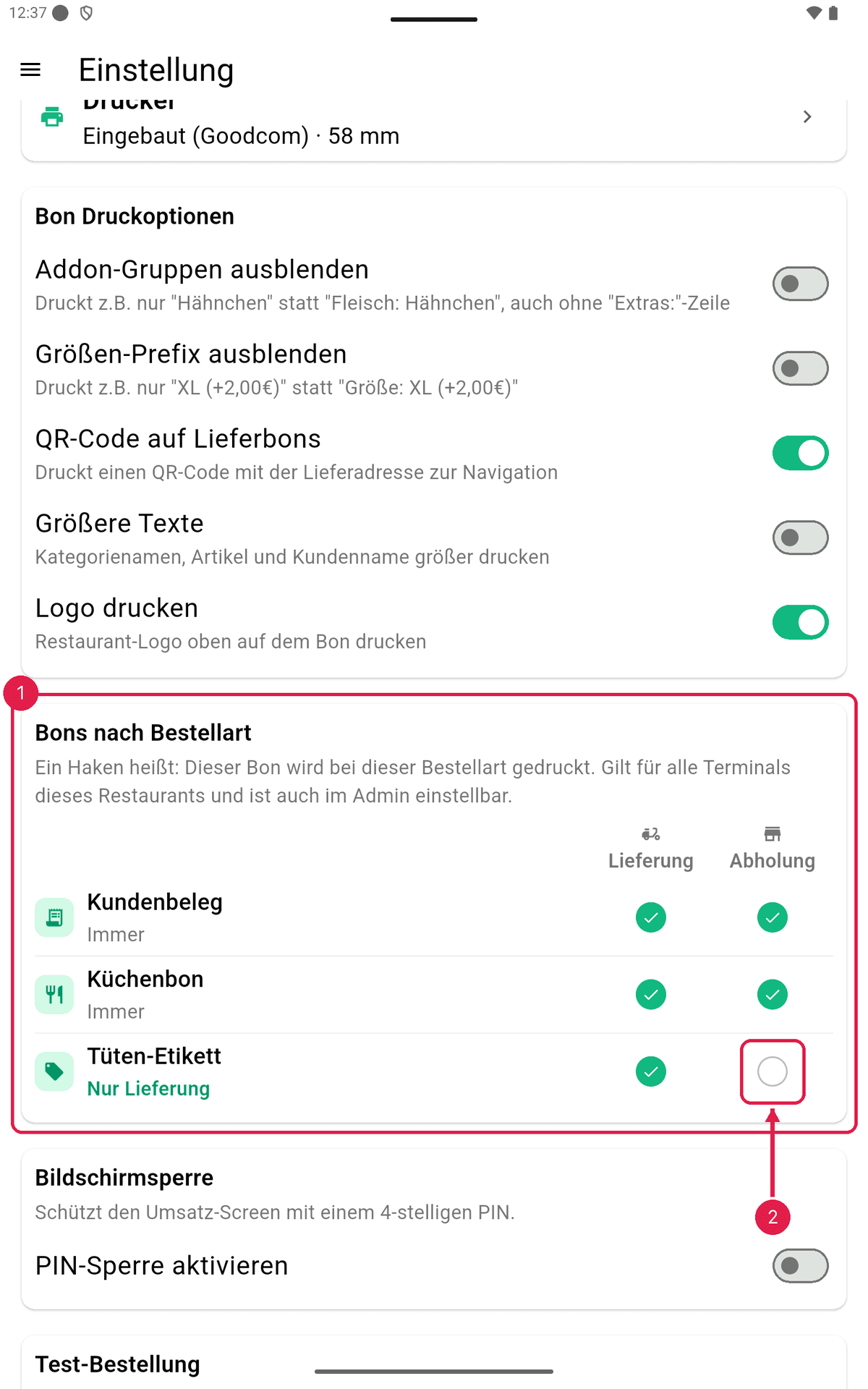
- The card is a small table: one row per receipt type, Kundenbeleg (customer receipt), Küchenbon (kitchen ticket) and Tüten-Etikett, plus the columns Lieferung (delivery) and Abholung (pickup). A tick means the receipt is printed for this order type.
- Below the name you see the result, in the same words as in the admin area:
- Immer (always): both ticks set, the receipt is printed for every order. This is the default, so the terminal prints this way as long as you change nothing.
- Nur Lieferung (delivery only): only the tick for delivery.
- Nur Abholung (pickup only): only the tick for pickup.
- If a receipt type differs from Immer, this is shown in green below its name.
- At least one tick stays set per receipt type. If you tap the last one, a note explains that a receipt can only be switched off completely in the admin area under Bons je Bestellung (receipts per order).
- The setting applies to all terminals of the restaurant and to every printer. It is also in the admin area under Bon-Druck (receipt printing), and both always show the same state, see Print receipts only for delivery or pickup.
- How many receipts of a type are printed is still set in the admin area and per printer. If a receipt type is set to 0, it is printed for no order type.
- If no receipt at all would be printed for an order type, the terminal still prints a customer receipt to be safe. An accepted order never ends without a receipt.
- When reprinting with several printers, the terminal only offers the receipts planned for this order.
Requirements
The order terminal is connected with your restaurant.
Step by step
Set the ticks
Open Einstellung (settings) in the menu. Below the card Bon Druckoptionen (receipt print options) is the card Bons nach Bestellart. In the row of a receipt type tap the tick for Lieferung or Abholung to set or remove it. In the picture the tick for Abholung is removed for the Tüten-Etikett, and below it now says Nur Lieferung. The choice applies at once, no save button is needed.
Result
The next orders print each receipt type only for the chosen order type.
Tips
- On narrow devices the icons in front of the receipt types are left out, so the names have room.
- Without internet the terminal keeps your choice and sends it as soon as it is online again.
Frequently asked questions
Why is a customer receipt still printed for pickup?
Because otherwise no receipt at all would be printed with the settings. The terminal then prints a customer receipt to be safe. Set the tick for this order type again for one receipt type.
Does this apply only to this terminal?
No. The setting belongs to the restaurant. All terminals and the admin area show the same choice.