Set the number of receipts per order
Set how many customer receipts, kitchen tickets and bag labels the terminal prints per order.
What it is for
Under Bons je Bestellung (receipts per order) you set how many slips the terminal prints for each accepted order.
What changes
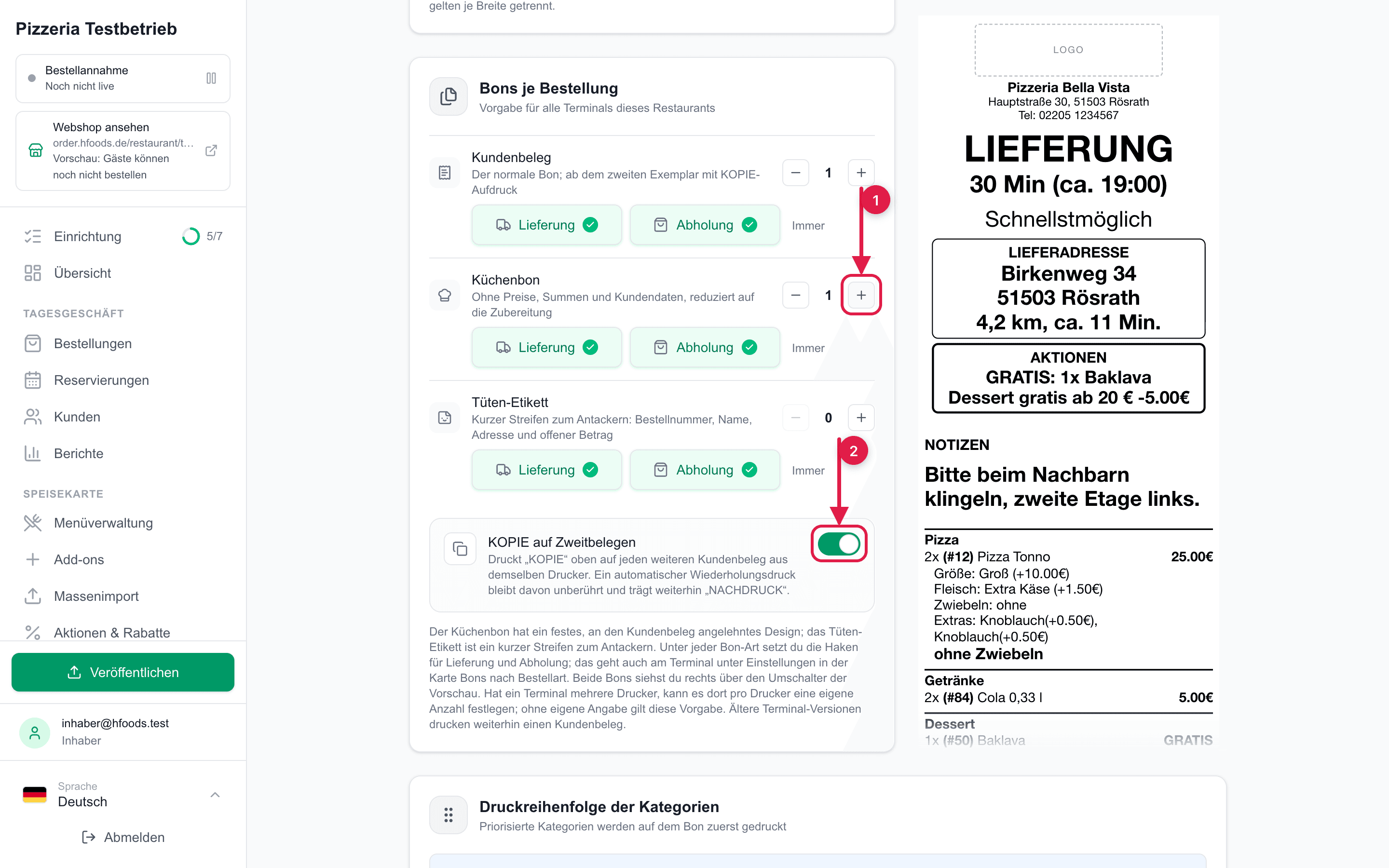
- Kundenbeleg (customer receipt): the normal receipt. From the second copy on with a KOPIE (copy) print.
- Küchenbon (kitchen ticket): without prices, totals and customer details, reduced to preparation.
- Tüten-Etikett (bag label): a short strip to staple on with order number, name, address and amount due. It also comes with pickup orders, as long as you set nothing else.
- Below each receipt type you also set one tick each for Lieferung (delivery) and Abholung (pickup), see Print receipts only for delivery or pickup.
- KOPIE auf Zweitbelegen (COPY on second receipts): prints "KOPIE" at the top of every further customer receipt from the same printer. An automatic reprint still carries "NACHDRUCK" (reprint).
- If everything is set to 0, the terminal still prints one customer receipt to be safe. An accepted order is never left without a receipt. The page warns you in this case.
- If a terminal has several printers, it can set its own number per printer there. Without its own setting, this default applies. Older terminal versions still print one customer receipt.
Requirements
You are signed in to the admin area as the owner.
Step by step
Set the number
In the sidebar on the left, click Bon-Druck (receipt printing). Under Bons je Bestellung raise or lower the number with + and -, in the picture one Küchenbon. The KOPIE auf Zweitbelegen switch sets the copy print. You see the kitchen ticket and label via the preview switcher. Click Speichern (save) at the bottom, see Save the receipt settings.
Result
The terminal prints the set number per order.
Applies to all terminals
The settings belong to the restaurant, not to a single device. A newly paired terminal takes them over automatically, and several terminals print identical receipts. Changes take effect as soon as the terminal is online again.