Connect a domain for the landing page
Connect a second domain of your own that shows your landing page while orders run through your shop domain.
What it is for
In Einstellungen (settings) under Eigene Domain (own domain) you first connect the domain for your shop. If you have a landing page, you can give it a domain of its own. That way your main domain "meinrestaurant.de" shows the landing page, for example, while orders run through the shop domain, such as "bestellen.meinrestaurant.de". This is optional.
What changes
- Guests who open the landing page domain see your landing page.
- The shop domain keeps leading straight into the shop.
- If you switch the landing page off later, the landing page domain shows the menu in the meantime.
Requirements
- You are signed in to the admin area as the owner, and the Eigene Domain section is unlocked for you.
- Your shop domain is connected and Aktiv (active). Until it is, the card reads "Erst möglich, wenn deine Shop-Domain oben aktiv ist." (only possible once your shop domain above is active). See Connect your own domain.
- Your landing page is switched on. Otherwise the card reads "Erst möglich, wenn die Landing Page aktiv ist." (only possible once the landing page is active). See Switch on the landing page.
- You own the second domain and can change its DNS records at your domain provider.
Step by step
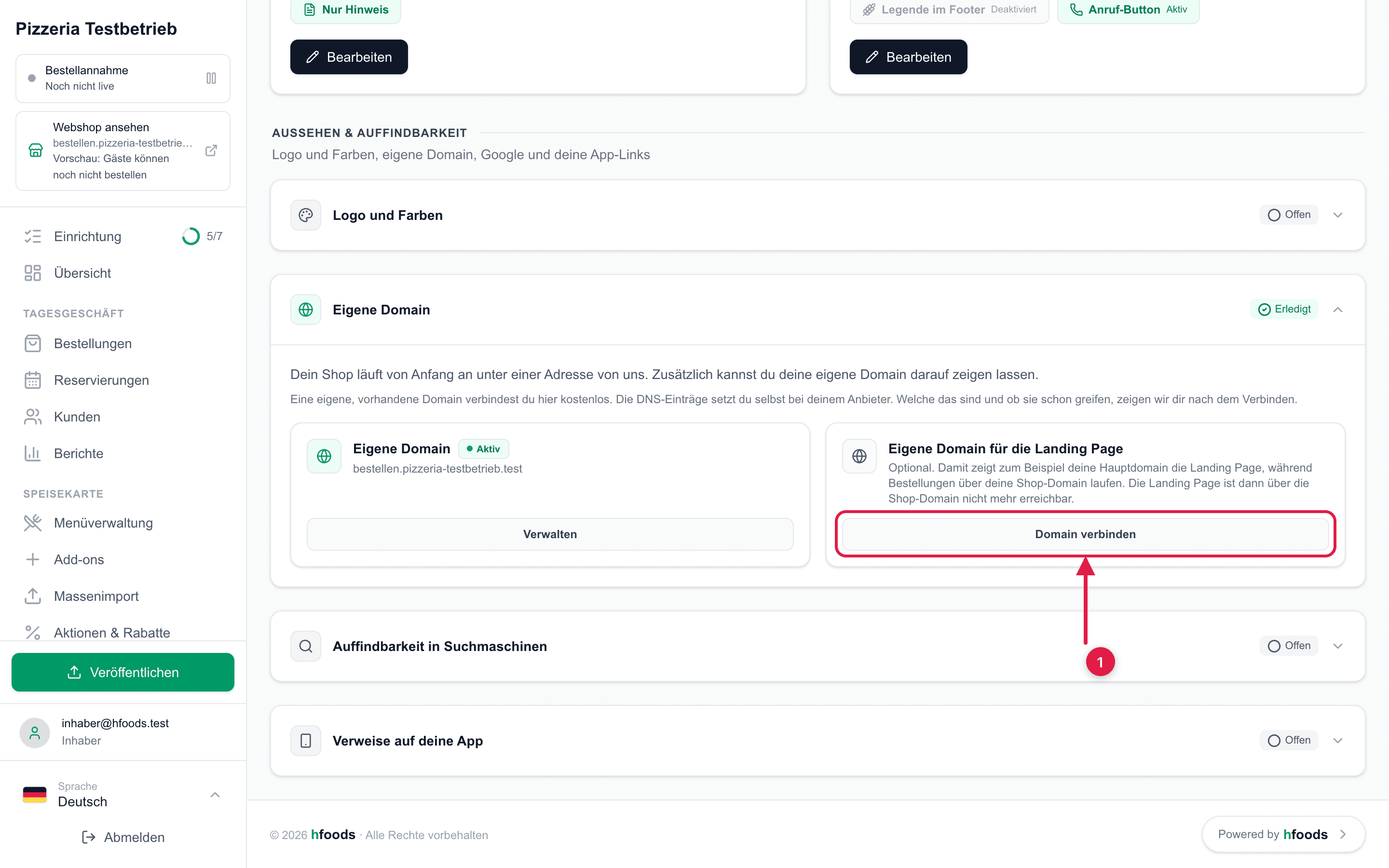
Open the landing page card
Click Einstellungen (settings) under Shop on the left and, in the Aussehen & Auffindbarkeit (look and visibility) group, open the Eigene Domain card. Next to your shop domain you see the card Eigene Domain für die Landing Page (own domain for the landing page). Click Domain verbinden (connect domain) there.
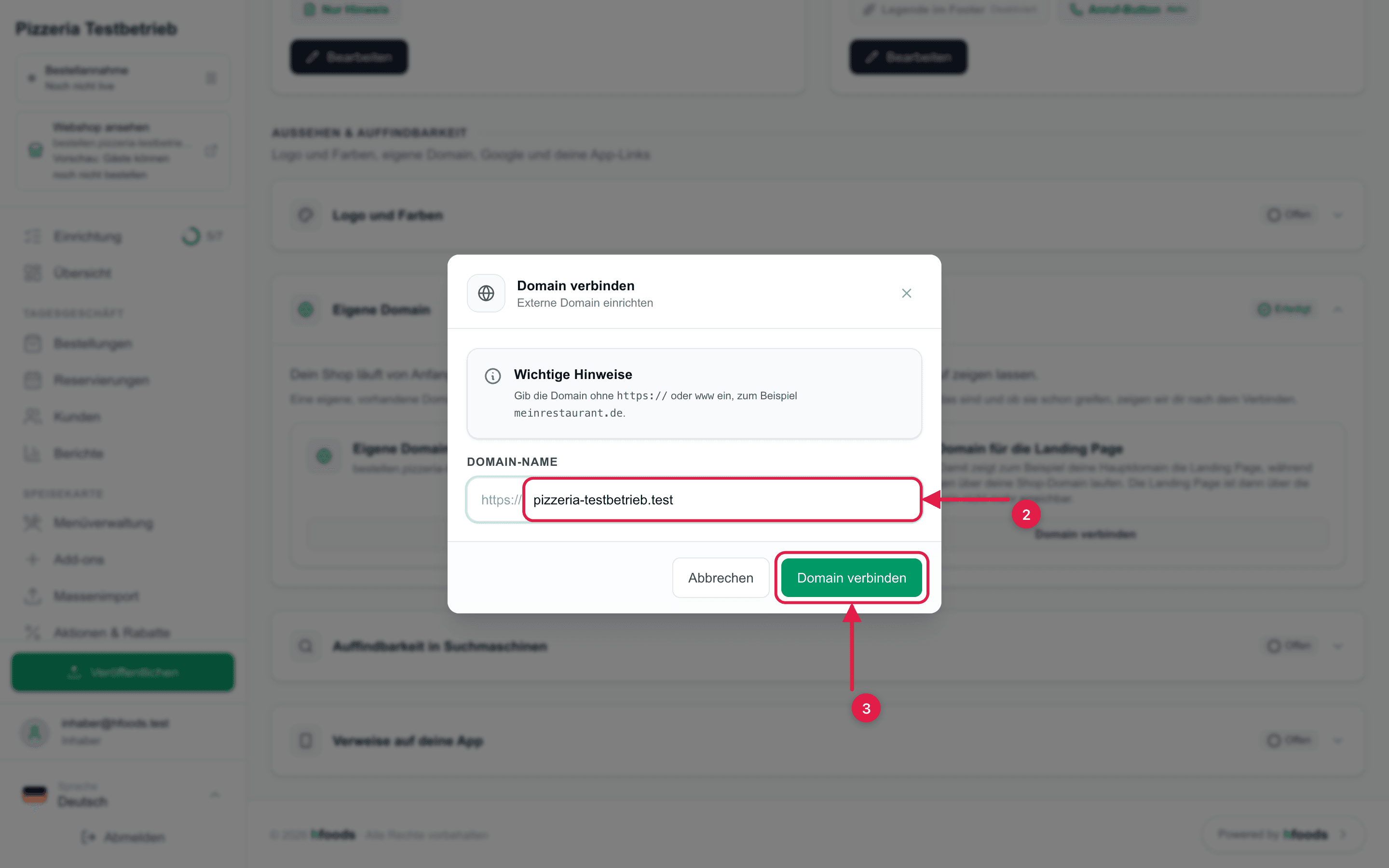
Enter the domain
Under Domain-Name (domain name) enter the domain for the landing page, without "https://", for example "meinrestaurant.de". Then click Domain verbinden.
Set the DNS records
The card then shows the DNS records you have to set at your domain provider. Copy them exactly, ideally with copy and paste. Status prüfen (check status) under Domain verwalten (manage domain) tells you whether they have arrived. That usually takes a few minutes, rarely up to 24 hours. Once it reads Domain ist Live (domain is live), the domain is ready.
Result
Your landing page is reachable under its own domain, and the shop domain keeps leading straight to ordering. The Beim Aufruf der Domain (when the domain is opened) choice on the shop domain disappears as soon as a landing page domain is connected, because both addresses now have a fixed role.
Frequently asked questions
Do I need a second domain for this?
Yes, or a second address of the same domain. A common setup is the main domain for the landing page and a subdomain such as "bestellen.meinrestaurant.de" for the shop.
The card shows "Nicht verfügbar" (not available).
A requirement is missing. The text on the card names it: either the shop domain is not active yet or the landing page is off.
How do I remove the domain again?
Open the card with Verwalten (manage), click Domain löschen (delete domain) and confirm with Löschen (delete).