Create the imprint and legal texts
Have the imprint, privacy policy and terms of your shop created from reviewed templates and save them.
What it is for
A public shop needs an imprint, a privacy policy and usually terms and conditions. These texts appear in the footer of your shop. You do not have to write them yourself: the admin area puts your details into reviewed templates. You then read them through and add whatever differs for you.
What changes
- The imprint, privacy policy and terms appear in the footer of your shop.
- The message Deine Rechtstexte sind gespeichert. (your legal texts are saved) confirms saving.
- The web shop takes over the change with Veröffentlichen (publish).
Requirements
- You are signed in to the admin area as the owner, and the area is unlocked.
- Name, address and phone number are entered under Betrieb und Kontakt (business and contact), see Maintain business details. The template takes them from there.
Important note
Use the templates. Only then do they contain the system's mandatory technical details, such as hosting, cookies under the German TDDDG and the technical service provider hfoods. If they are missing, formal legal warnings may follow. The texts are templates and not legal advice. As the operator you are responsible for their content.
Step by step
Enter the details for the template
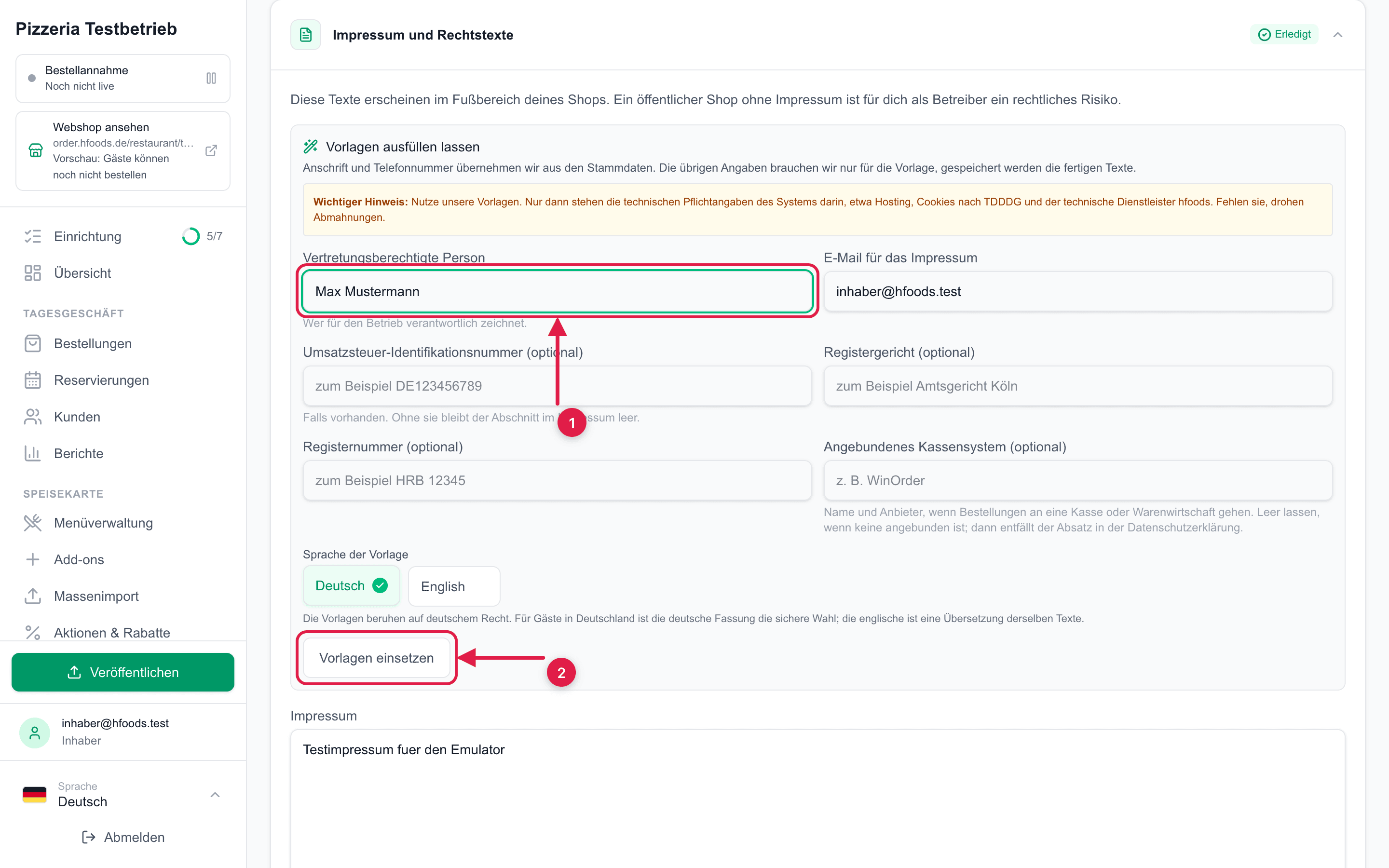
In the sidebar on the left, click Einstellungen (settings) under Shop. In the Bezahlung & Rechtliches (payment and legal) group, open the Impressum und Rechtstexte (imprint and legal texts) card. Under Vorlagen ausfüllen lassen (have templates filled in) you enter:
- Vertretungsberechtigte Person (authorised representative): who signs responsible for the business, for example "Max Mustermann".
- E-Mail für das Impressum (email for the imprint): an address where you can be reached.
- Umsatzsteuer-Identifikationsnummer (optional) (VAT ID): if you have one. Without it, that section of the imprint stays empty.
- Registergericht (optional) (registry court) and Registernummer (optional) (registration number): if your business is in the commercial register, for example "Amtsgericht Köln" and "HRB 12345".
- Angebundenes Kassensystem (optional) (connected POS system): if your online orders are passed to a POS or inventory system, its name and provider, for example "WinOrder". The privacy policy then names this system as a recipient of the order data. Without an entry, the paragraph is left out.
If something is missing, "Bevor wir die Vorlagen ausfüllen können, fehlt noch:" (before we can fill in the templates, this is still missing) appears below with a list. When everything is there, click Vorlagen einsetzen (insert templates).
Check the texts and save
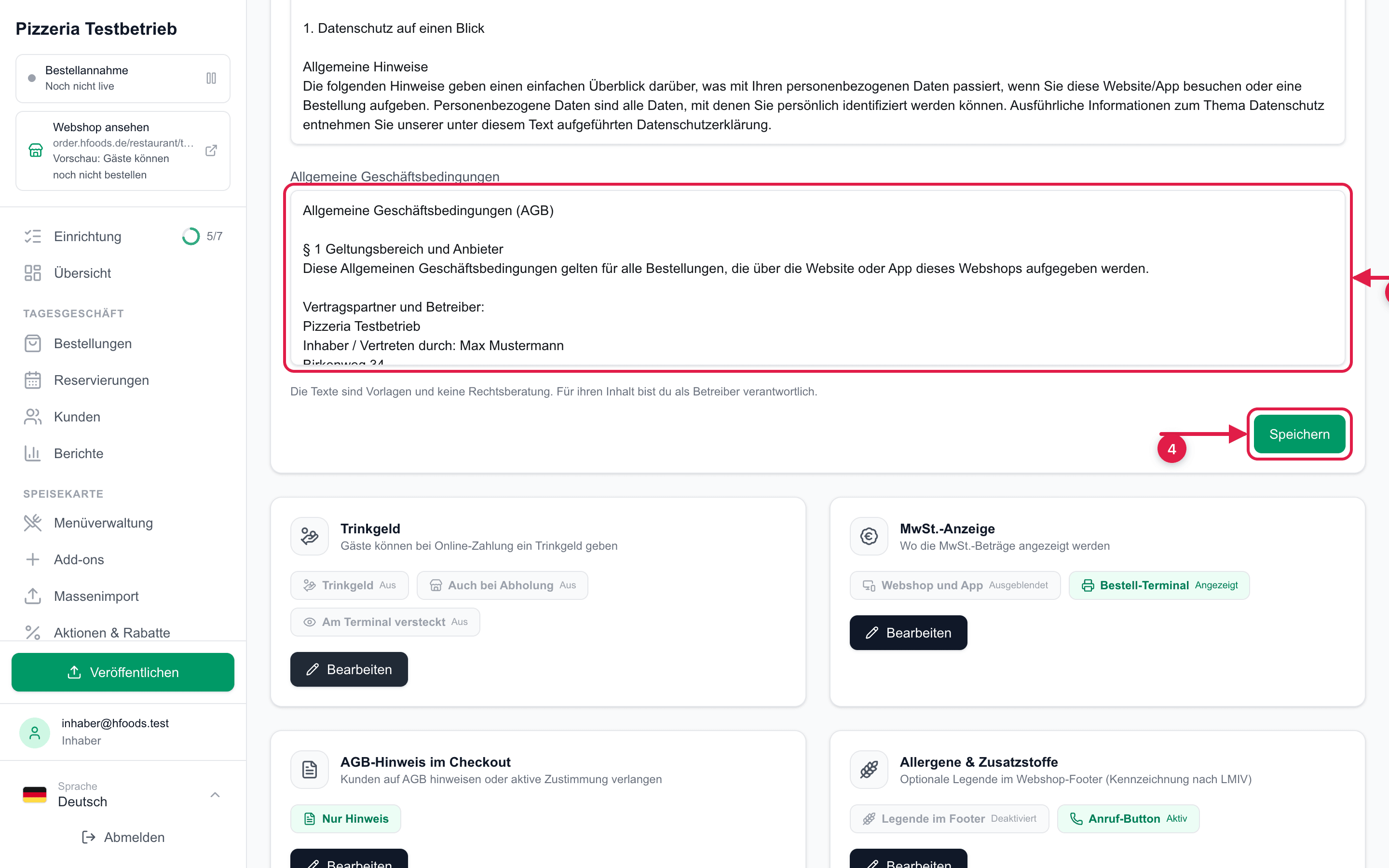
The Impressum (imprint), Datenschutzerklärung (privacy policy) and Allgemeine Geschäftsbedingungen (terms and conditions) fields are now filled in. Read them through calmly and add whatever differs for you. Then click Speichern (save) at the bottom and then Veröffentlichen (publish) on the left.
Result
Your shop has an imprint, privacy policy and terms. The Impressum und Rechtstexte step in setup is done.
Tips
- Insert the templates again after changing your business details so the imprint stays current. Check your own additions afterwards.
- When in doubt, have the texts reviewed by a legal advisor.
Frequently asked questions
Can I use my own legal texts?
You can edit the fields freely. Make sure, though, that the mandatory technical details from the template are kept.