Search items
Quickly find a specific item by name or description in a category with many items.
What it is for
In large categories with many items, the search saves you long scrolling. You type part of the name or description, and the list only shows matching items.
What changes
Nothing on your menu. The search only filters what the admin area shows. Guests do not notice anything, and you do not need to publish.
Requirements
You are signed in to the admin area as the owner and have opened the category page, see Open a category.
Step by step
Type a search term
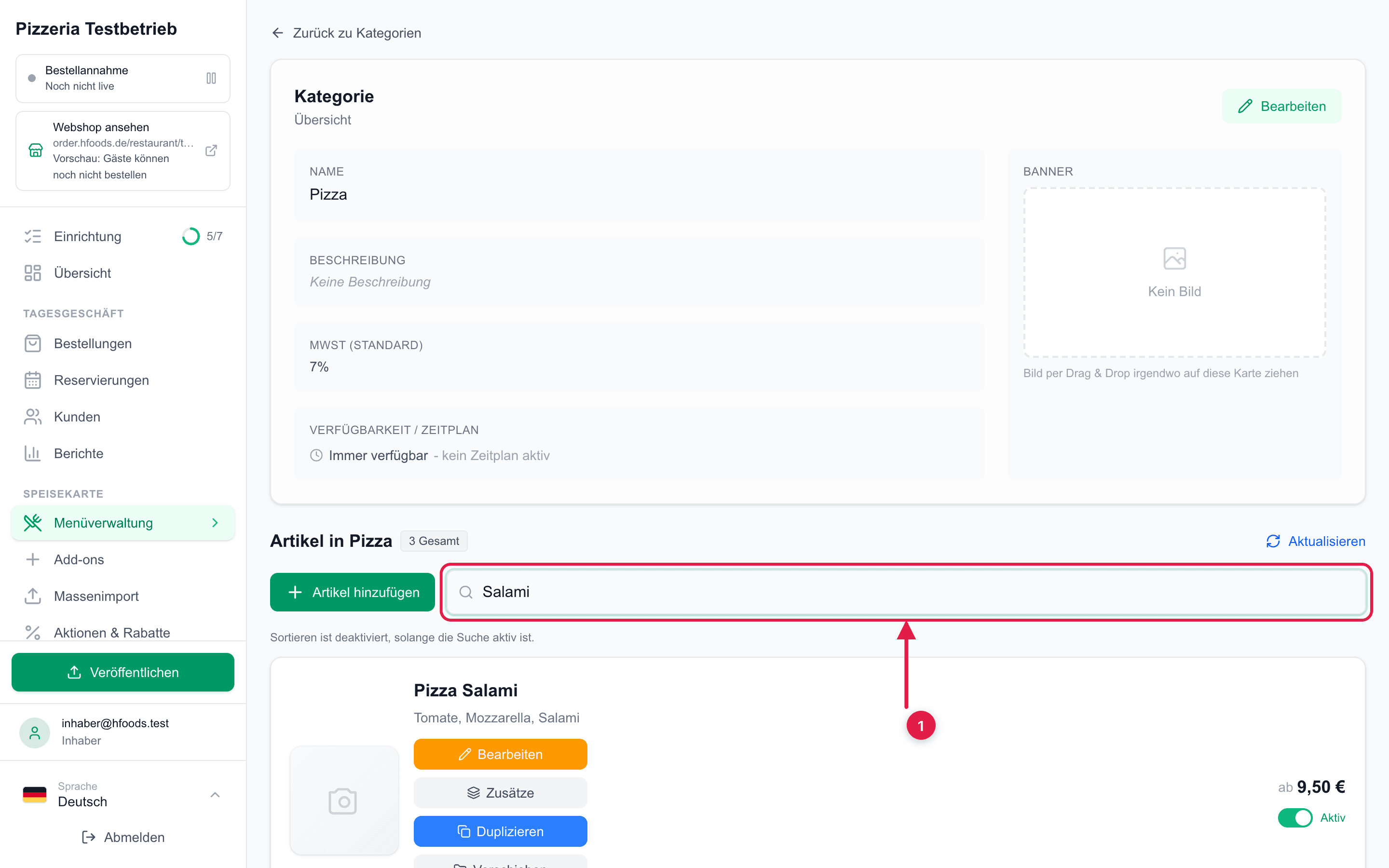
Above the item list, click the Suche Menüpunkte... (search menu items) field and type a search term, in the picture for example "Salami". The list immediately shows only items whose name or description contains the term. Upper and lower case do not matter.
While there is a search term in the field, the hint Sortieren ist deaktiviert, solange die Suche aktiv ist. (sorting is disabled while the search is active) appears. Clear the field to see all items again.
Result
The list only shows the matching items. With the buttons on the item you edit, duplicate, move or delete it as usual.
Tips
- Search for an ingredient, for example "Thunfisch" (tuna), to find all items that mention it in the description.
- Short terms find more. "Sal" finds Salami and Salat.
Frequently asked questions
Does the field search all categories?
No, only the items of the category whose page you have open.
Why can't I sort while searching?
The order can only be changed sensibly in the complete list. Clear the search field and you can sort again, see Sort items.