Limit a promotion to certain sizes
Make a promotion apply to single sizes of an item only, for example a free dessert with every 60x40cm family pizza.
What it is for
Many menus don't list a family pizza as an item of its own but as a size of a pizza: a Salami pizza comes in 30cm and in 60x40cm. If a promotion should only apply to one of these sizes, pick the size instead of the whole item in the promotion's item selection.
A typical example: "a free honey cake with every 60x40cm pizza". The family pizza is the condition, the honey cake is the gift. Anyone ordering a 30cm pizza gets nothing for free. In this guide the example is "free apple spritzer with a large pizza", because the test menu has the sizes "Klein (26 cm)" (small) and "Groß (32 cm)" (large).
You can pick sizes in every promotion that works with items, so also with % Rabatt auf ausgewählte Artikel (% off selected items), Eins kaufen, eins gratis (buy one, get one free), Mittagsangebot (lunch offer) or Speisen-Paket (meal bundle).
What changes
- The promotion only counts items in the chosen size. The same pizza in another size neither meets the condition nor gets a discount.
- In the web shop and in the app, the promotion's selection window only offers the allowed sizes, with the size name after the item, for example "Pizza Salami (60x40cm)". A free item goes into the cart in exactly that size.
- If the required pizza is already in the cart, the selection window shows "Schon in deinem Warenkorb" (already in your cart) for that group. The guest then only picks the gift and doesn't have to take a second pizza.
- If a chosen size is sold out or no longer on the menu, it no longer counts for the promotion and isn't offered either.
- You don't need to publish anything, the admin area hands promotions over when you save.
Requirements
- You are signed in to the admin area as the owner, see Sign in.
- The items have sizes, see Create an item with sizes.
Step by step
Choose a template
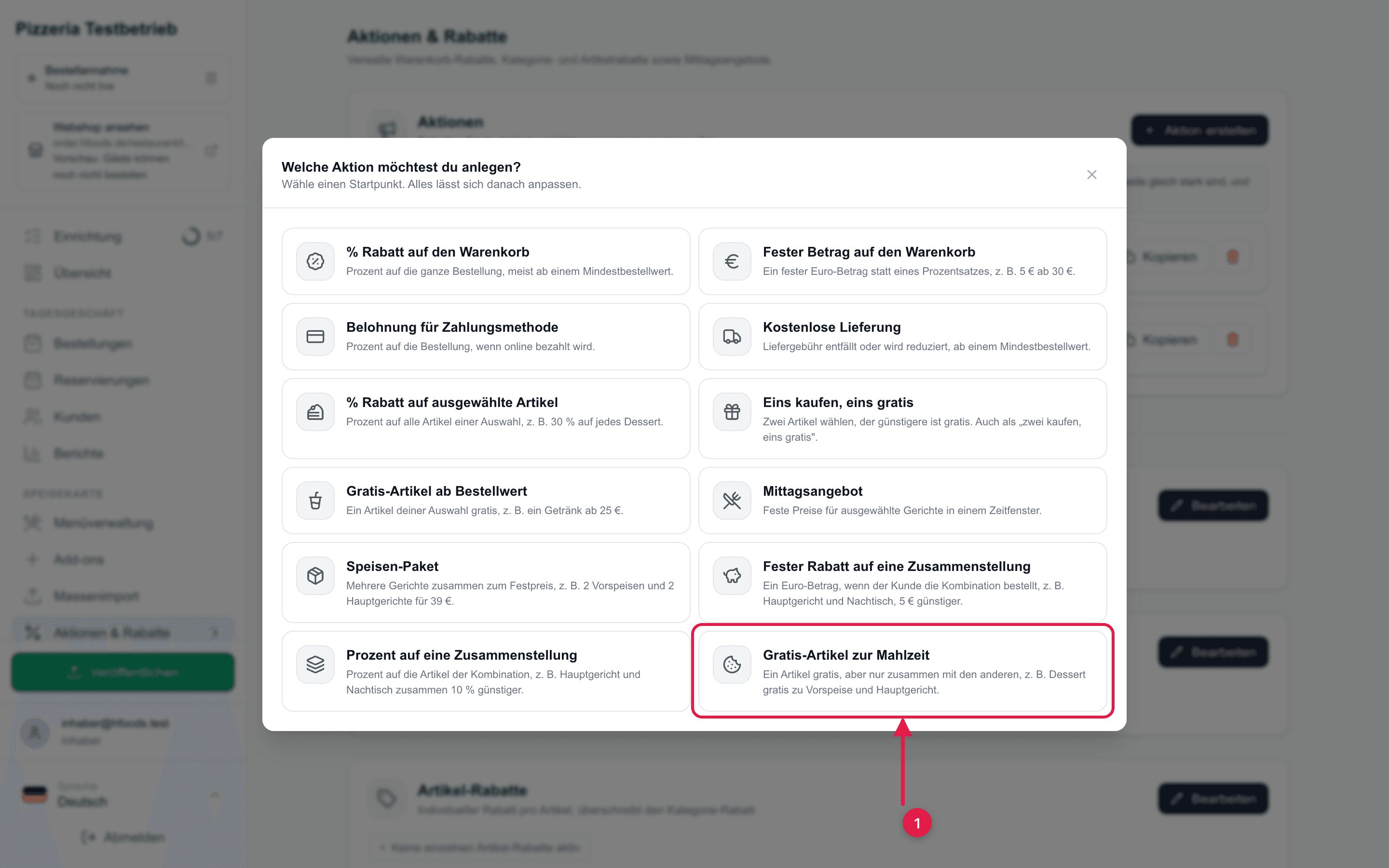
Click Aktionen & Rabatte (promotions and discounts) on the left and Aktion erstellen (create promotion) at the top right. For a gift that comes with a particular pizza, choose Gratis-Artikel zur Mahlzeit (free item with a meal). This template only gives an item away together with the other items of the promotion. In the Inhalt (content) step, enter an Überschrift (headline), for example "Honigkuchen gratis zur Pizza 60x40cm", and click Weiter (next).
Adjust the groups
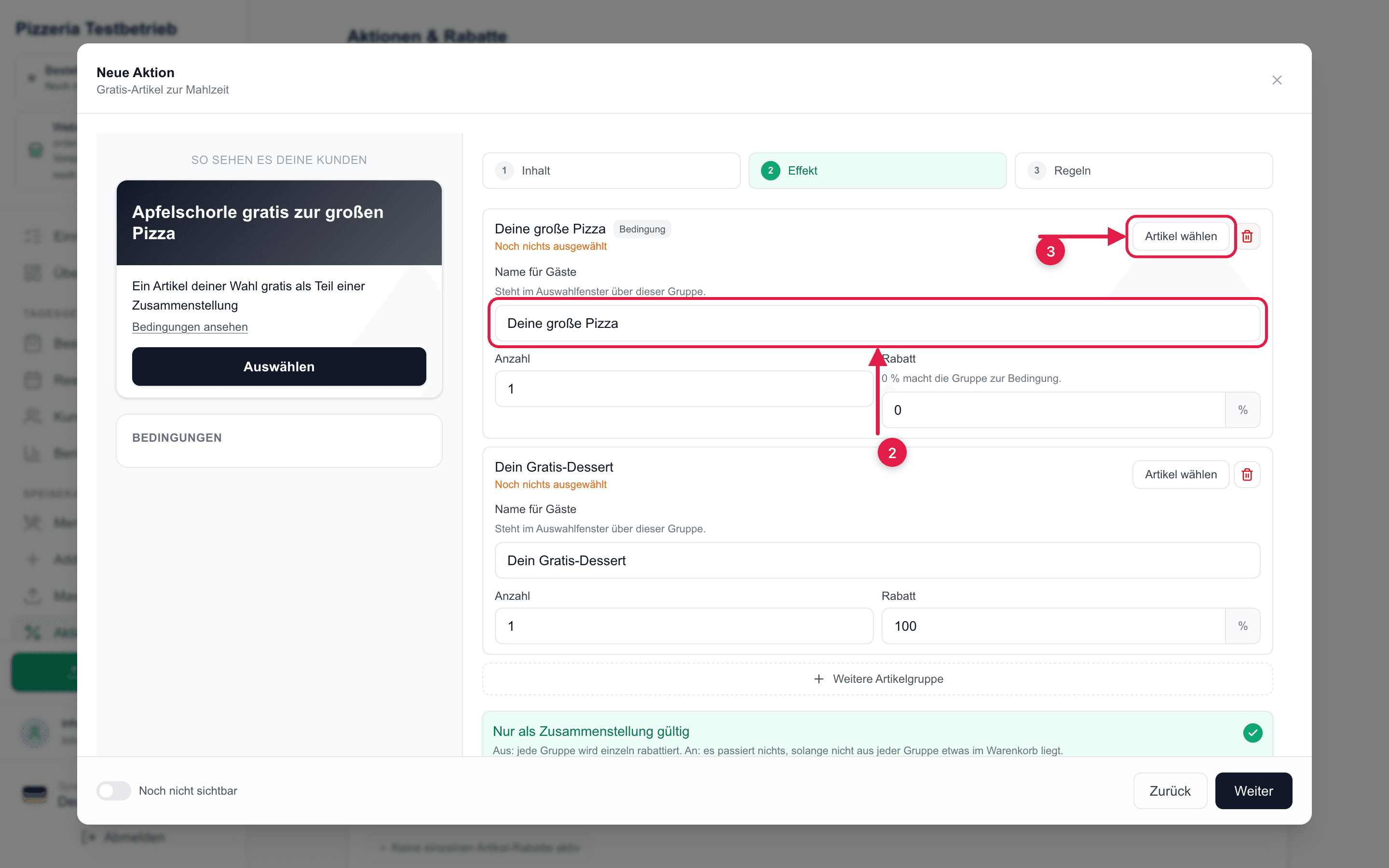
The Effekt (effect) step lists the promotion's groups. The template comes with three: Vorspeise (starter), Hauptgericht (main course) and Dein Gratis-Dessert (your free dessert).
- A group with a Rabatt (discount) of 0 % is a Bedingung (condition). The guest has to order it, it doesn't get cheaper. Below the field it says "0 % macht die Gruppe zur Bedingung." (0 % turns the group into a condition).
- The group with 100 % is the gift.
- Anzahl (quantity) is how many items the guest orders or gets per group.
- Name für Gäste (name shown to guests) appears above the group in the selection window. The template fills it in, and you can change it any time, for example from "Hauptgericht" to "Your 60x40cm pizza". If you leave it empty, guests see "Auswahl 1", "Auswahl 2" and so on (choice 1, choice 2).
If you only need one condition, remove the Vorspeise group with the bin icon next to it. Give the Hauptgericht group a name that fits the pizza and click Artikel wählen (choose items) on it.
Tick the sizes
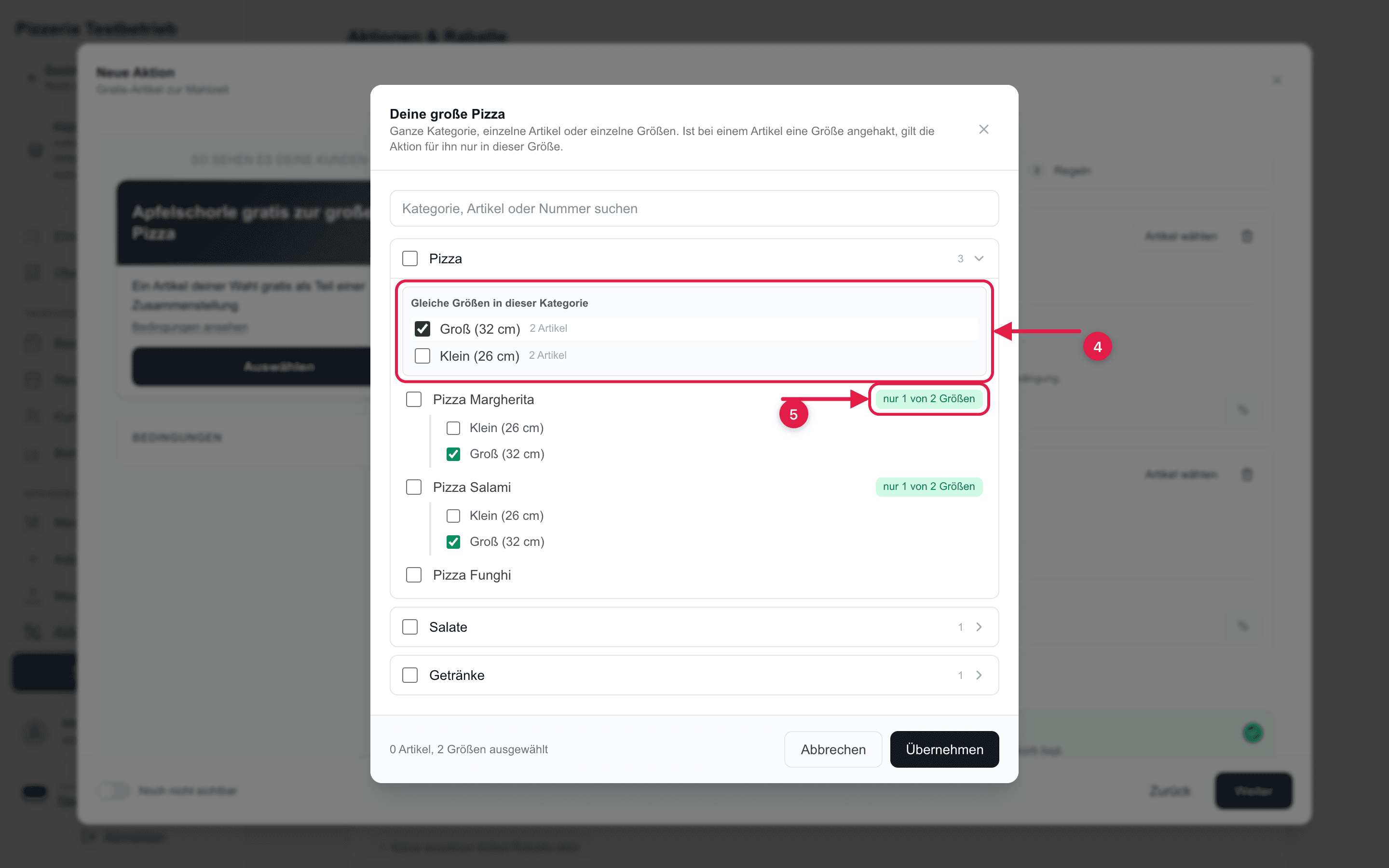
The item selection shows all categories. Expand the category your pizzas are in. If several items in that category share a size, Gleiche Größen in dieser Kategorie (same sizes in this category) appears at the top. One tick there picks that size for every item of the category at once, for example all pizzas in 60x40cm. To pick single sizes, tick them right below the item.
Every item with only some of its sizes picked shows a note such as "nur 1 von 2 Größen" (only 1 of 2 sizes). The bottom of the window shows how much is selected. Click Übernehmen (apply).
The same rule applies as for add-ons: once a size is ticked for an item, the promotion only applies to that item in this size, even if its category or the whole item is selected as well.
Check the selection and finish
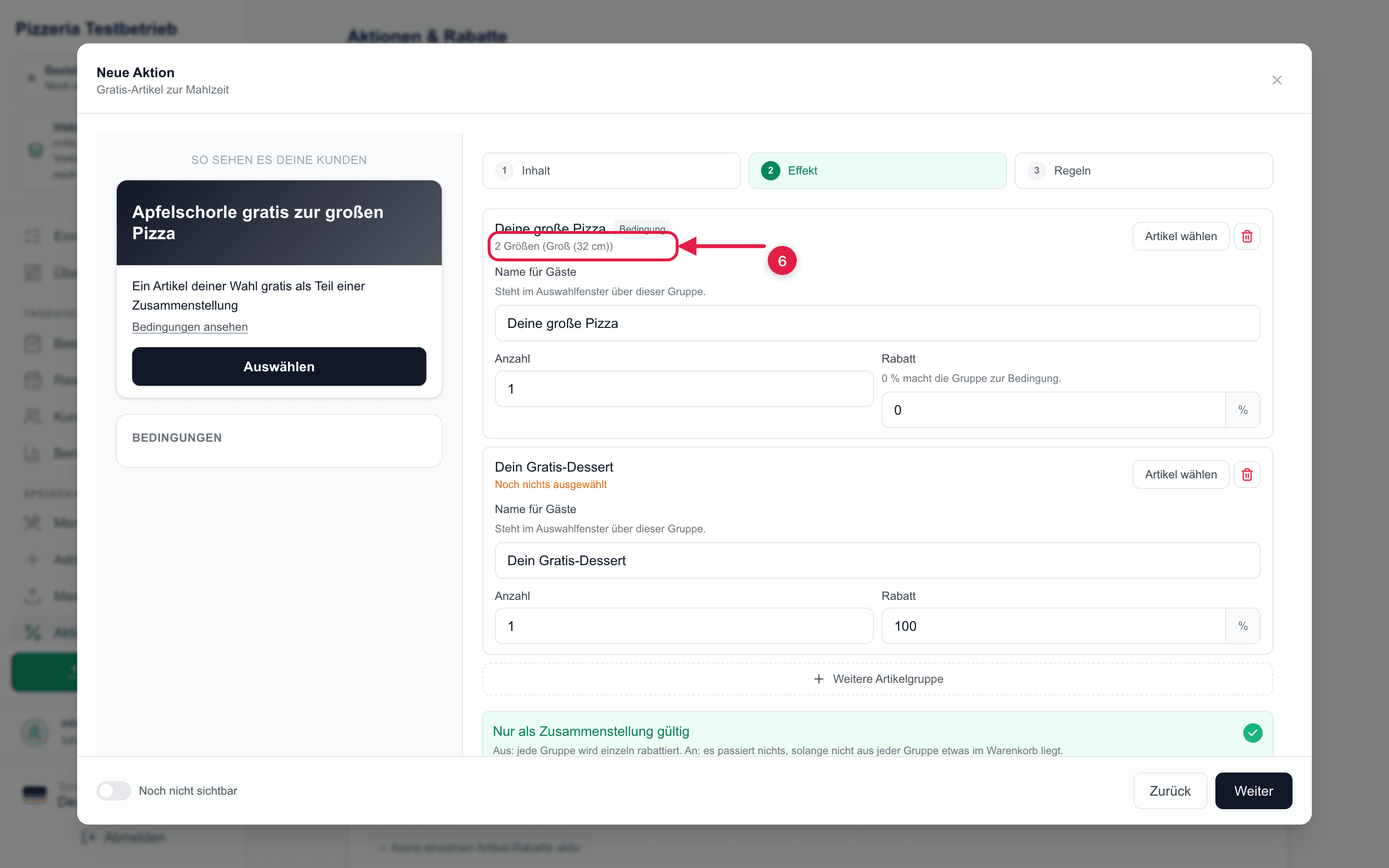
The group name now shows what is selected, for example "2 Größen (Groß (32 cm))" (2 sizes, large). That way you can see at a glance whether you picked the right size.
Under Dein Gratis-Dessert, use Artikel wählen to pick the gift, for example the honey cake. Click Weiter, check order type and period in the Regeln (rules) step, see Set the rules and schedule of a promotion, switch the promotion to visible at the bottom left and click Speichern (save).
Result
The promotion appears in the list and only applies to the chosen sizes. In the example, a guest gets the honey cake for free as soon as a 60x40cm pizza is in the cart, and only then.
Tips
- If a group only has sizes and no category, it contains exactly what is ticked. A new pizza added to the menu later only joins once you tick its size as well.
- If you pick the whole category and sizes on top, every item of that category without a ticked size counts in every size, including items added later. The note below the group points this out: "Artikel dieser Kategorien ohne angehakte Größe zählen in jeder Größe, auch neu hinzukommende." (items in these categories without a ticked size count in every size, including new ones). For "60x40cm only", pick just the sizes.
- With an Anzahl of 1, the gift comes once per order, even if the guest orders two family pizzas.
Frequently asked questions
What happens if the guest orders the pizza in another size?
The condition isn't met and nothing is free. For the condition, the selection window only offers the pizzas in the chosen size.
Can I change a group's name later?
Yes. Open the promotion with Bearbeiten (edit), change Name für Gäste in the Effekt step and save. From then on, the web shop and the app show the new name in the selection window.
Does the guest have to take the pizza through the selection window?
No. If they add it to the cart from the menu as usual, the selection window shows "Schon in deinem Warenkorb" (already in your cart) for the condition, and they only pick the gift.
Does this work in the app as well?
Yes, the app gets the promotion from the server. It needs a current version for this. Older app versions do show a promotion with sizes but can't redeem it. Nothing is ever charged incorrectly.