Create delivery areas by postcode
Create delivery areas by postcode, each with a minimum order value, delivery fee and tax rate.
What it is for
Under Liefergebiete (delivery areas) you decide where you deliver, what delivery costs and from which order value. At the top of the window you choose the Zonensystem (zone system): Postleitzahlen (postcodes), Geo-Zonen (geo zones) or Nach Entfernung (by distance). The system selected when saving applies. This guide is about Postleitzahlen: you deliver to certain postcodes, each with its own minimum order value and delivery fee.
What changes
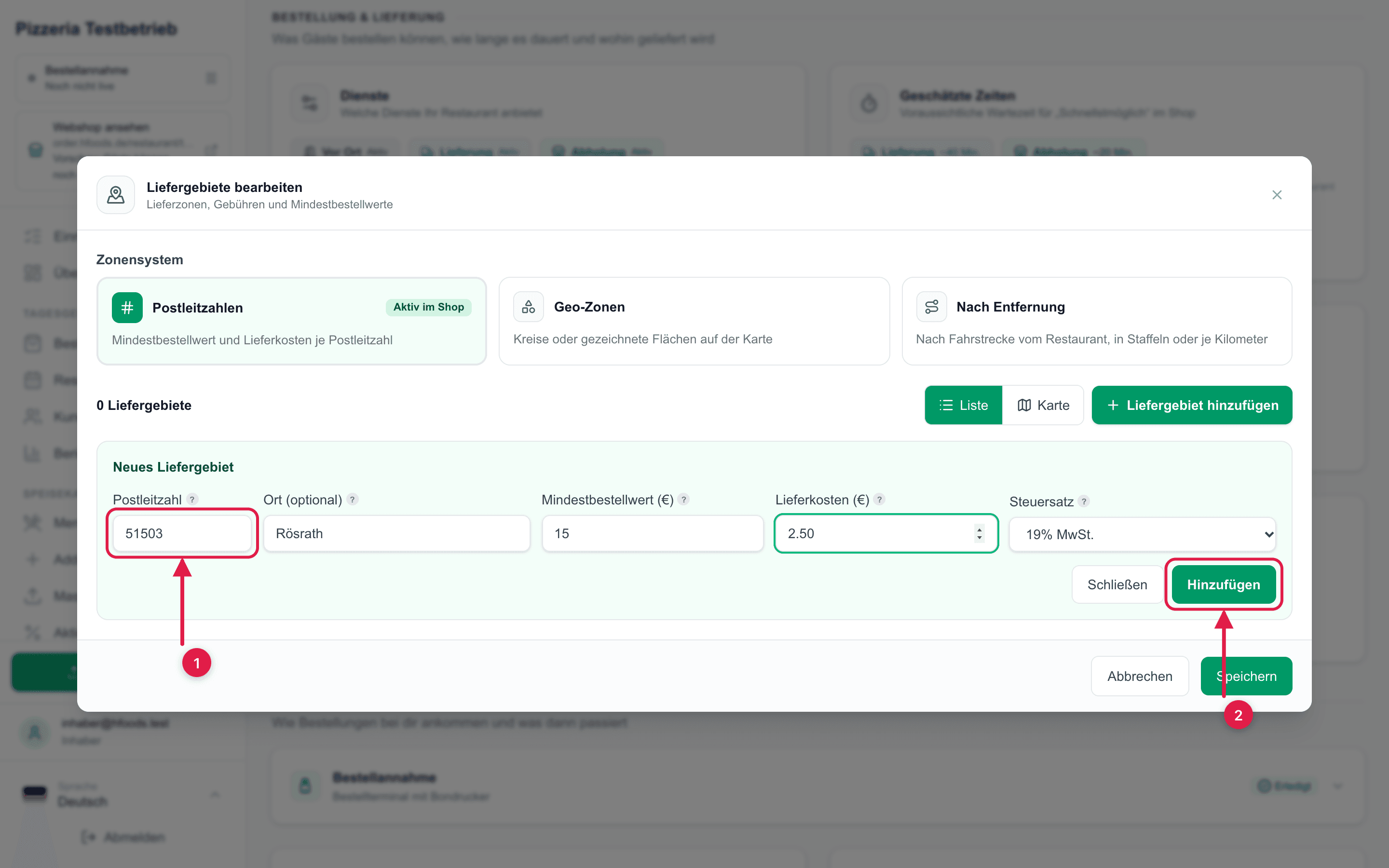
- Each postcode has Ort (optional) (town), Mindestbestellwert (€) (minimum order value), Lieferkosten (€) (delivery fee) and Steuersatz (tax rate).
- Guests with another postcode cannot have orders delivered.
- If you enter a postcode that is already listed, its entry is updated.
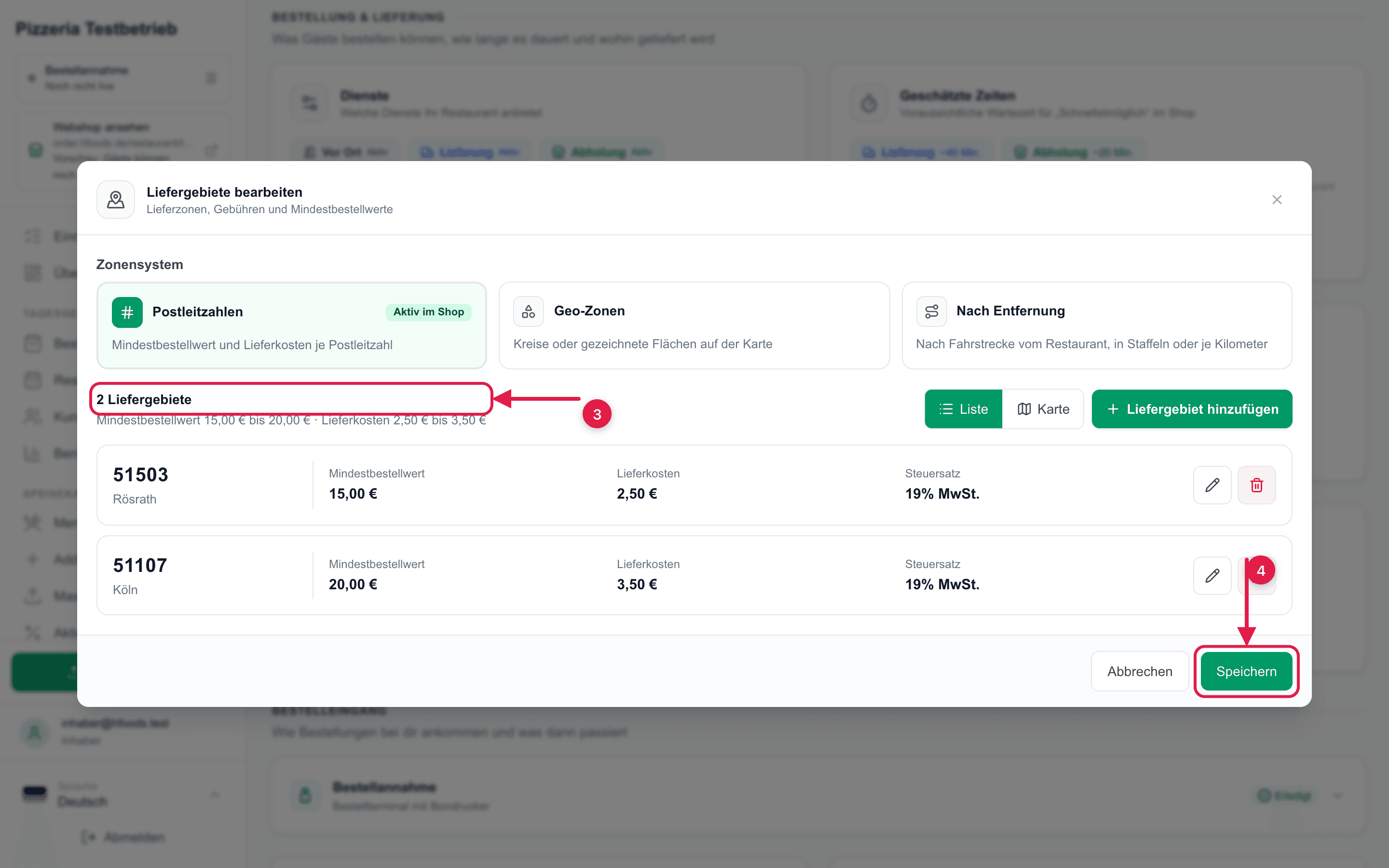
- Each area has its own row in the list. The pencil (Liefergebiet … bearbeiten, edit delivery area) lets you change it, Fertig (done) closes editing, and the bin removes it.
- The postcode needs 4 or 5 digits, the minimum order value and fee must not be negative. Otherwise a message appears, such as Bitte eine Postleitzahl mit 4 oder 5 Ziffern eingeben (please enter a postcode with 4 or 5 digits).
- For the Steuersatz (tax rate) of the delivery fee: 19% (voll) (standard), 7% (ermäßigt) (reduced) or 0% (steuerfrei) (exempt). Clarify which rate applies to your delivery fees with your tax adviser.
Requirements
You are signed in to the admin area as the owner. Staff do not see the settings.
Step by step
Enter a postcode
In the sidebar on the left, click Einstellungen (settings). Next to Liefergebiete click Bearbeiten (edit). Under Zonensystem (zone system), Postleitzahlen (postcodes) is selected. Click Liefergebiet hinzufügen (add delivery area). In the Neues Liefergebiet (new delivery area) section enter Postleitzahl, Ort (optional), Mindestbestellwert (€) and Lieferkosten (€) and choose the Steuersatz. Click Hinzufügen (add) or press Enter.
Check the list and save
Repeat this for each postcode. Schließen (close) folds the Neues Liefergebiet section away again. Above the list you see the number of areas, for example "2 Liefergebiete" (2 delivery areas), and below it each area with minimum order value, delivery fee and tax rate. With Karte (map) instead of Liste (list) you see the areas on the map. Click Speichern (save).
Result
Your delivery areas are set. The card shows them with minimum order value and fee.
Only valid after saving
Changes in the window only apply after Speichern (save). The web shop and the app then take them over by themselves, you do not need to publish.