Set automatic cancellation
Set which orders that nobody accepts are cancelled automatically, and after how many minutes.
What it is for
If nobody accepts a new order on the order terminal, the system cancels it automatically. The guest gets an email, and money paid online is released or refunded. So nobody waits in vain for their food.
By default this applies to all orders after 15 minutes. Here you set which orders are cancelled automatically and after how many minutes.
An example: you prepare a lot at lunchtime and sometimes only get to the terminal after a while. With a time limit of 30 minutes there is more time to accept.
What changes
- Welche Bestellungen werden storniert? (which orders are cancelled?)
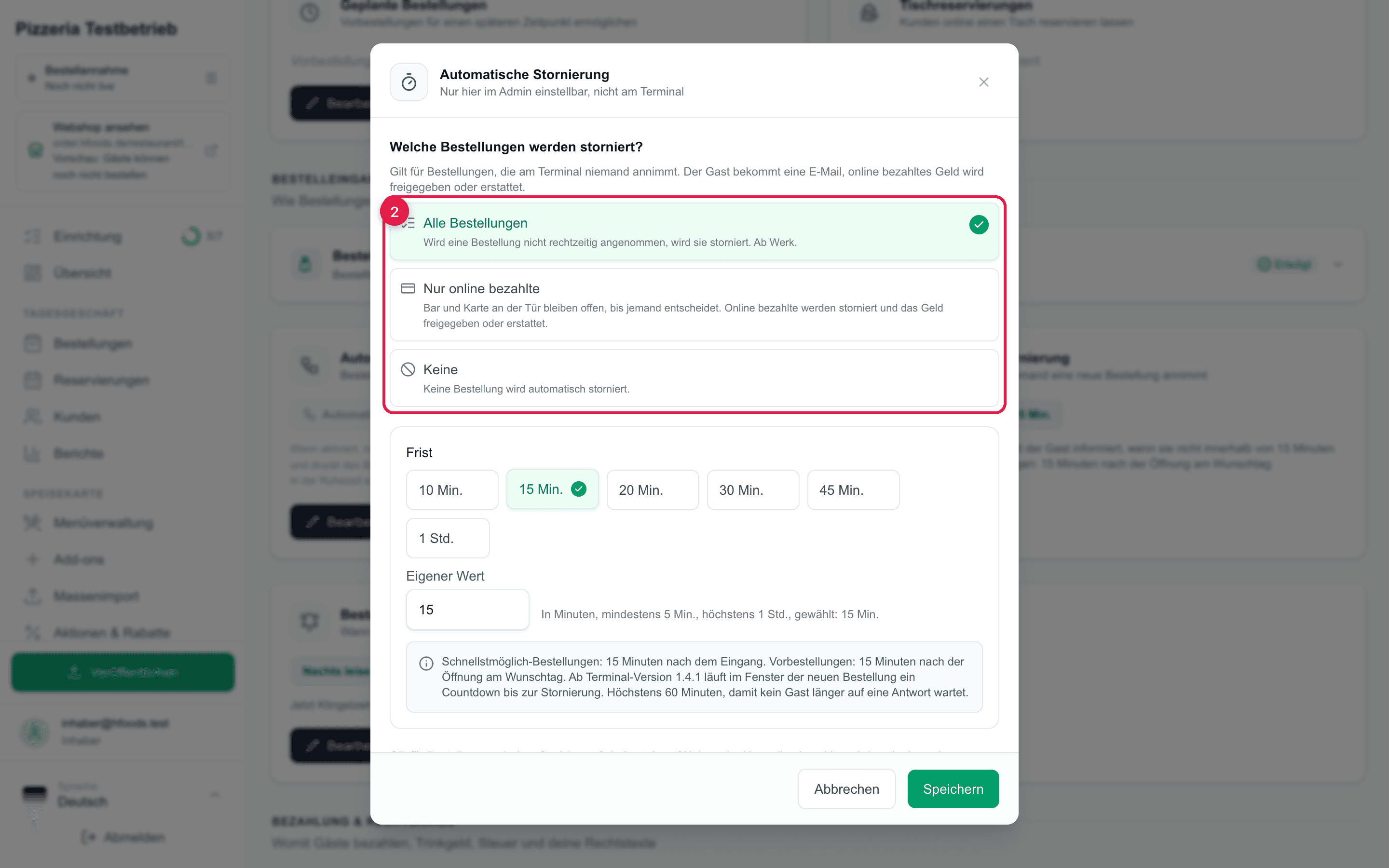
- Alle Bestellungen (all orders, default): if an order is not accepted in time, it is cancelled.
- Nur online bezahlte (only orders paid online): orders paid in cash or by card at the door stay open until someone accepts or cancels them on the terminal. Orders paid online (card, PayPal) are cancelled and the money is released or refunded.
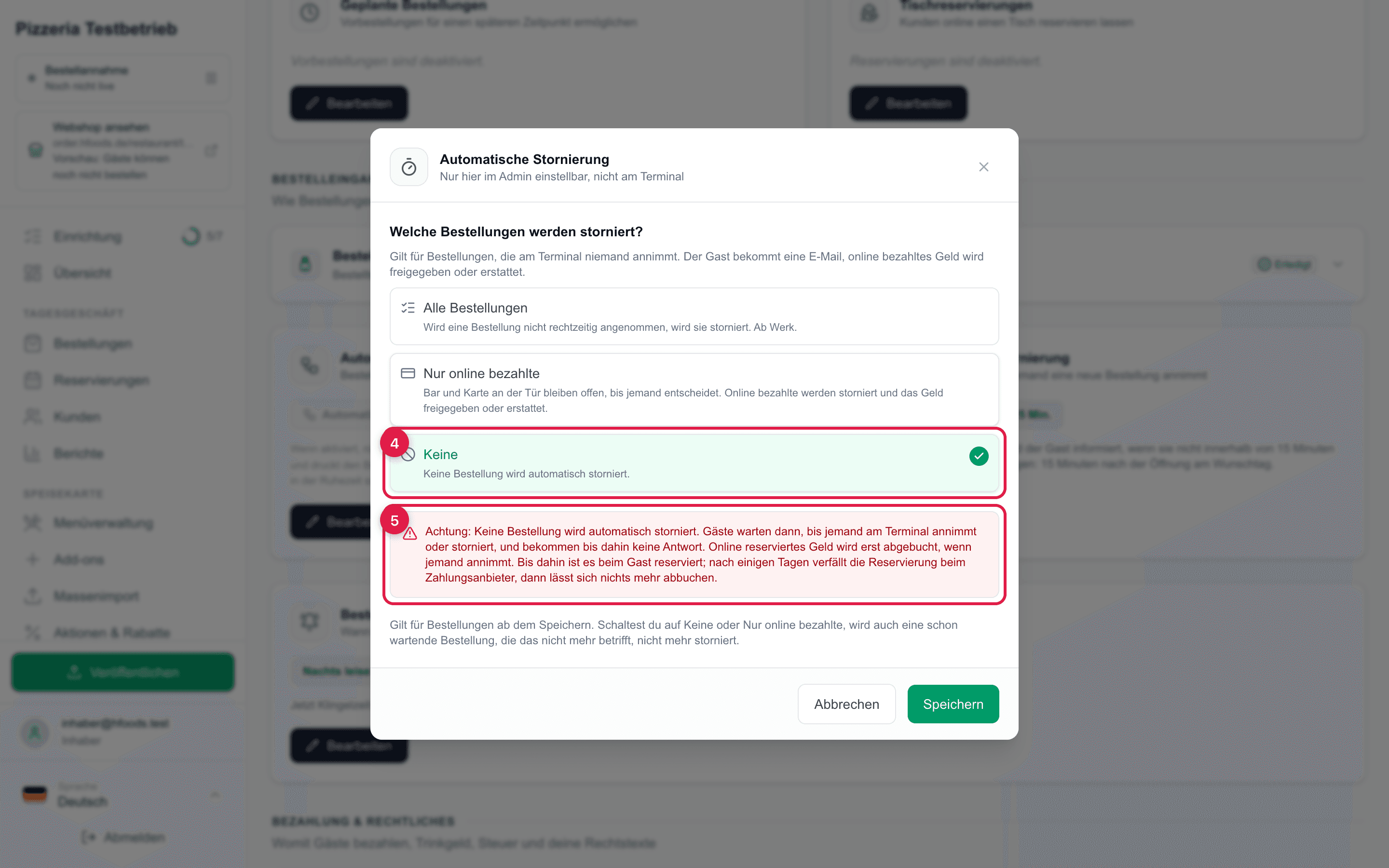
- Keine (none): no order is cancelled automatically. Open orders stay until someone decides on the terminal, and the guest gets no answer until then.
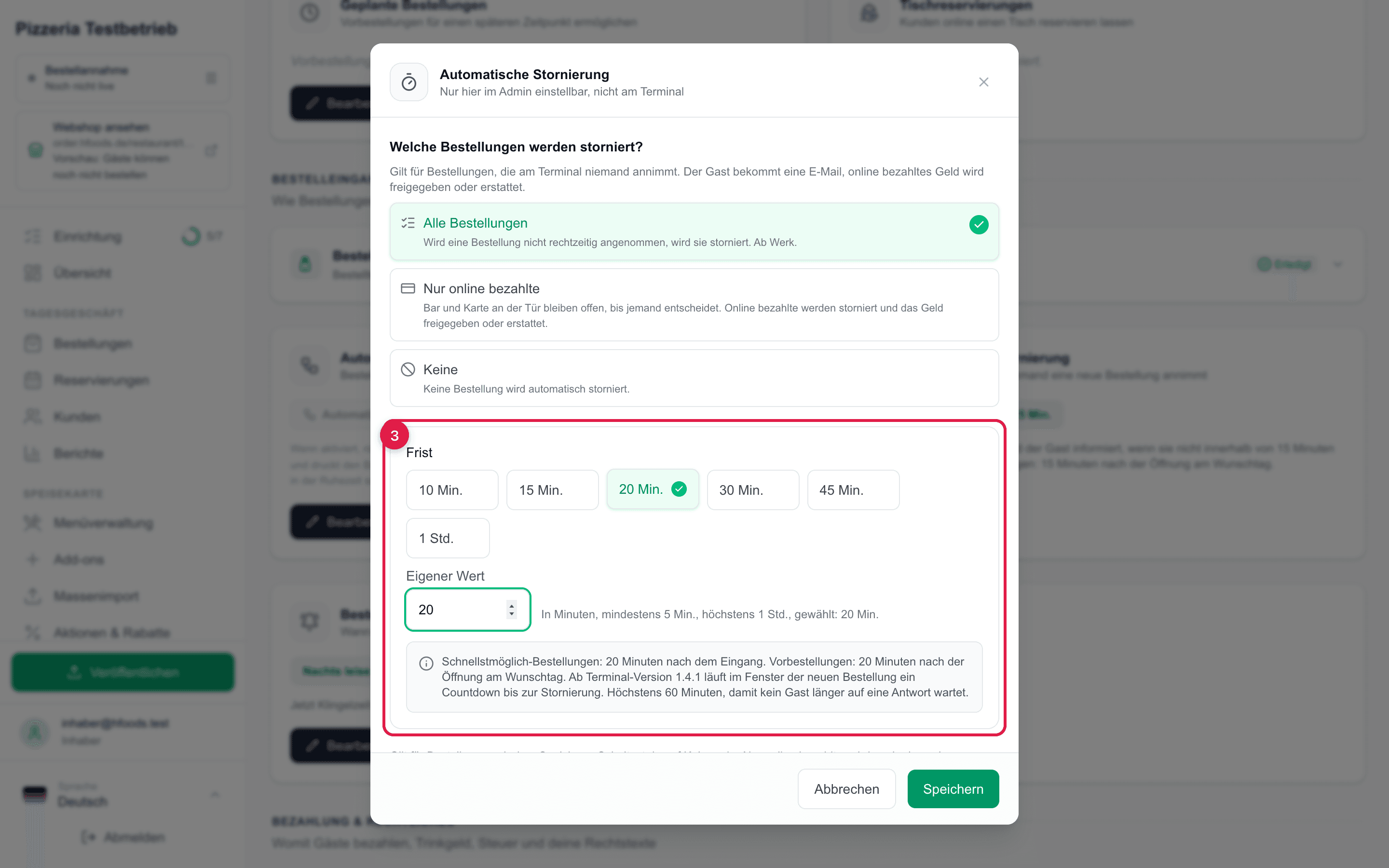
- Frist (time limit): 10, 15, 20, 30, 45 minutes or 1 hour to choose from, or as Eigener Wert (own value) 5 to 60 minutes. Default 15 minutes.
- ASAP orders: this long after they arrive.
- Pre-orders: this long after the opening on the requested day. A pre-order for today: this long after the next opening.
- At most 60 minutes, so that no guest waits longer for an answer.
- From terminal version 1.4.1 a countdown to the cancellation runs in the window of every new order, see Recognise a new order. Orders that are not cancelled automatically show no countdown.
- Money reserved online for an ASAP order is only charged once someone accepts the order. For an ASAP order that nobody accepts, no money is ever charged. Pre-orders paid online are charged when ordering and refunded on automatic cancellation.
- For ASAP orders the reason in the email to the guest names the minutes, for example „Bestellung wurde nicht innerhalb von 20 Minuten akzeptiert“ (order was not accepted within 20 minutes), for pre-orders „Vorbestellung wurde nicht rechtzeitig akzeptiert“ (pre-order was not accepted in time).
- Orders that are not cancelled automatically (with Keine, with Nur online bezahlte the cash orders) are shown as open on the terminal from version 1.4.1 for up to 14 days after they arrive. Even with automatic acceptance switched on, it no longer accepts such an order by itself once it is older than 3 hours (pre-order: once the requested day is over). It then waits in the order window for your decision. Both still apply for 14 days after you switch back to Alle Bestellungen, so that no open order from that time disappears.
- The setting applies to orders from the moment you save. If you switch to Keine or Nur online bezahlte, an order that is already waiting and no longer affected is not cancelled either.
- It can only be set here in the admin area, not on the terminal.
- Orders picked up by WinOrder are still never cancelled automatically, as before.
Requirements
You are signed in to the admin area as the owner. Staff do not see the settings.
Step by step
Open the card
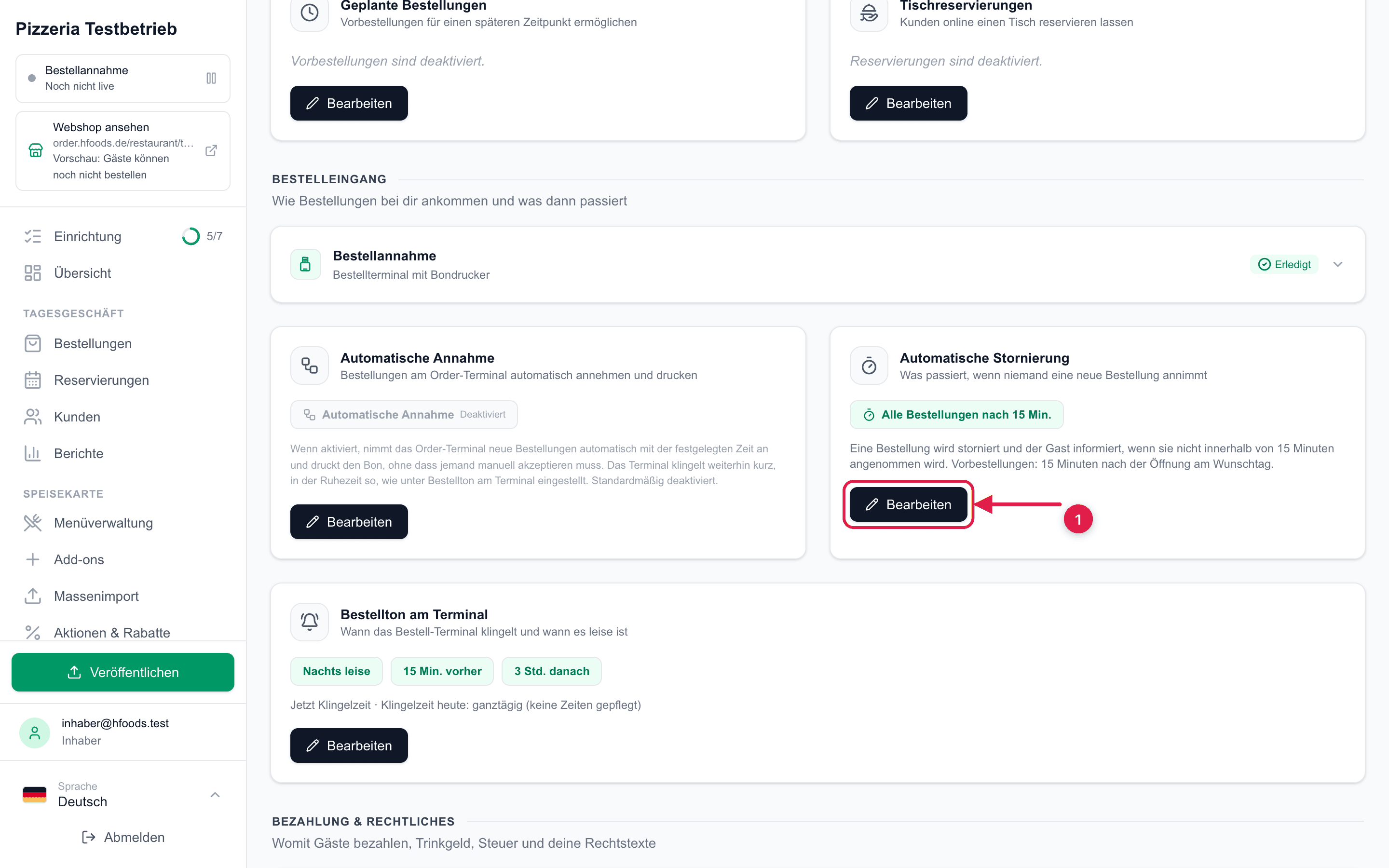
Click Einstellungen (settings) on the left. The card Automatische Stornierung (automatic cancellation) shows the current state, by default Alle Bestellungen nach 15 Min. (all orders after 15 min), and below it what that means. Click Bearbeiten (edit).
Set which orders are cancelled
Under Welche Bestellungen werden storniert? choose one of the three options: Alle Bestellungen, Nur online bezahlte or Keine. Below each one there is a short note on what it does.
Choose the time limit
Under Frist choose one of the times or enter a number between 5 and 60 under Eigener Wert. Your own value applies while you type, next to it it says for example „gewählt: 20 Min.“ (chosen: 20 min). Values below 5 become 5, values above 60 become 60. The grey note explains what the time limit means for ASAP orders and pre-orders.
Choose Keine (if you want)
If you choose Keine, the time limit disappears and a red note appears: guests then wait until someone accepts or cancels on the terminal and get no answer until then. Money reserved online is only charged once someone accepts. Until then it is reserved for the guest; after a few days the reservation expires at the payment provider, and then nothing can be charged any more. If you only want to leave cash orders open, choose Nur online bezahlte instead.
Save
Click Speichern (save). The message reads Automatische Stornierung gespeichert (automatic cancellation saved), and the card shows the new state.
Result
New orders are cancelled according to your setting, and the terminal shows in the window of every new order how much time is left to accept it.
Tips
- Keep the time limit rather short. The longer it is, the longer the guest waits for an answer.
- If the terminal accepts orders automatically, the time limit hardly matters, see Switch on automatic acceptance.
Frequently asked questions
Can the time limit be changed on the terminal?
No. Automatic cancellation affects money and can therefore only be set here in the admin area. The terminal only shows it.
Why not more than one hour?
So that no guest waits longer than an hour for an answer. Whoever orders ASAP expects a quick response.
Is money charged if nobody accepts?
No. Money reserved online for an ASAP order is only charged once someone accepts the order. If it is cancelled, the reservation is released. Pre-orders paid online are charged when ordering and refunded on cancellation.
What happens to orders that are already waiting when I change the time limit?
They keep the time limit they arrived with. Only if you switch to Keine or Nur online bezahlte is a waiting order that is no longer affected not cancelled any more.