Admin areaSettings
Switch services on and off
Decide whether your business is open on site and whether guests can order delivery and pickup.
What it is for
Under Dienste (services) you switch on or off, one by one, what your business offers.
What changes
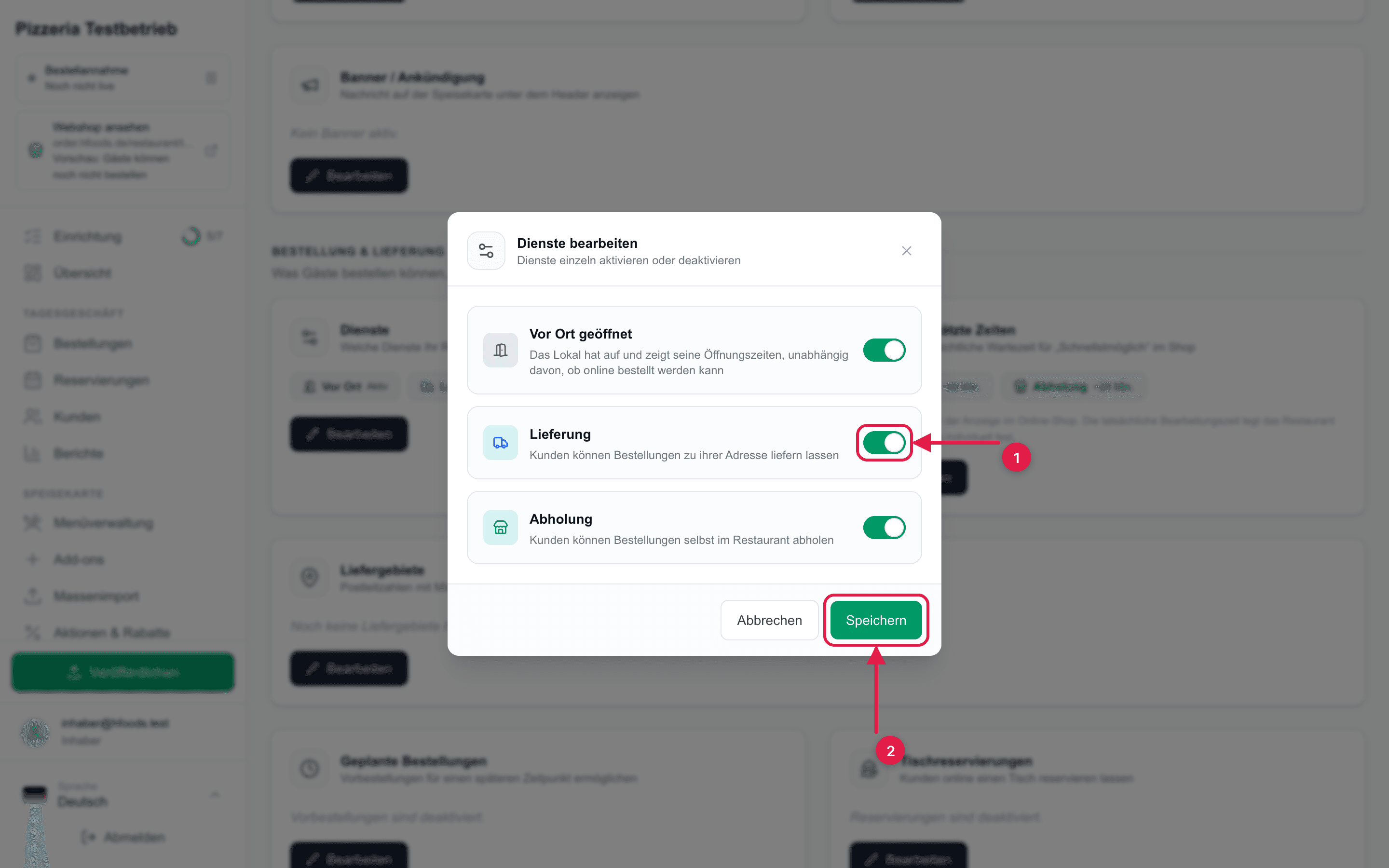
- Vor Ort geöffnet (open on site): the restaurant is open and shows its opening hours, regardless of whether online ordering is possible.
- Lieferung (delivery): guests can have orders delivered to their address.
- Abholung (pickup): guests can collect orders themselves at the restaurant.
- If only Vor Ort geöffnet is on, guests see the menu and opening hours but cannot order online. If all three are off, guests see the menu without an ordering option and without opening hours.
- The card shows Aktiv (active) or Deaktiviert (deactivated) for each service.
Requirements
You are signed in to the admin area as the owner. Staff do not see the settings.
Step by step
Switch services
In the sidebar on the left, click Einstellungen (settings). Next to Dienste click Bearbeiten (edit). In the Dienste bearbeiten (edit services) window flip the switches, in the picture Lieferung. Click Speichern (save).
Result
Your services are set. The web shop and the app take over the change by themselves after saving, you do not need to publish.